
Caesura
Caesura is a macOS menu-bar app that reminds you to drink water, stretch, rest your eyes, and breathe on science-backed intervals.
VisitPublished on:
June 26, 2026
Pricing:
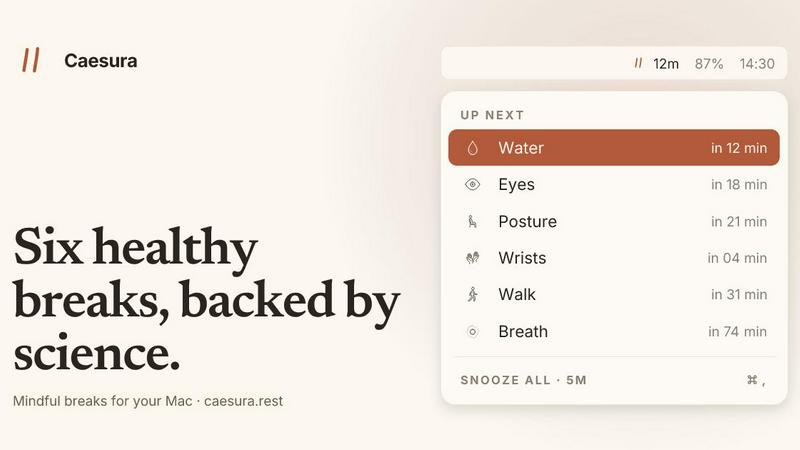
About Caesura
Caesura is a calm, minimal macOS menu-bar break manager designed specifically for people who spend long days at a desk. It functions as a gentle health companion that reminds you to perform six essential physical activities: drinking water, walking, stretching your wrists, resting your eyes, checking your posture, and breathing. Each of these six breaks operates on its own independent schedule, with intervals derived from scientific research rather than arbitrary round numbers. The core value proposition of Caesura is that it helps you maintain physical well-being throughout the workday without breaking your focus or cluttering your workflow. Unlike many health apps that require accounts, subscriptions, or complex setup, Caesura is a one-time purchase that lives quietly in your menu bar. It intelligently pauses all timers when it detects you are on a video call, sharing your screen, using a fullscreen app, or have Do Not Disturb enabled. When two reminders fall close together, Caesura coalesces them into one gentle break, ensuring you are never interrupted twice in a row. This product is for anyone who works at a computer for extended periods and wants evidence-based, non-intrusive reminders to maintain basic physical health.
Features of Caesura
Six Evidence-Based Break Intervals
Caesura tracks six distinct health habits, each on an interval backed by scientific research. Water breaks occur every 45 minutes based on hydration studies, walking breaks every 60 minutes, wrist stretches every 30 minutes, eye rests every 20 minutes, posture checks every 30 minutes, and breathing exercises every 90 minutes. Each interval comes from a specific study, not a round number, ensuring your body receives care on the cadence it actually needs. You can turn any break off, retune its interval, or change how it appears on your screen.
Intelligent Break Coalescing and Pausing
Caesura respects your workflow by automatically pausing all timers when it detects you are busy. It watches for video calls, screen sharing, fullscreen apps, Do Not Disturb mode, calendar events, games, and FaceTime activity. When any of these are active, every timer freezes and picks up exactly where it left off. Additionally, if two breaks come due within one minute of each other, Caesura coalesces them into a single prompt, so you never experience back-to-back interruptions.
Three Customizable Break Styles
Each break can be configured with one of three distinct presentation styles. The Overlay style takes over your entire screen until you press Return, ideal for breaks you might otherwise ignore. The Banner style slides in from under the menu bar and auto-dismisses after 30 seconds, providing a gentle nudge. The Notification style delivers a standard macOS notification, the lightest possible touch. You can assign different styles to different breaks based on their importance to you.
Guided Break Experiences
Caesura provides detailed guidance for specific breaks to ensure you perform them correctly. The breathing break includes a soft orb that expands and a progress bar that paces your inhale, hold, and exhale over three cycles. The eye break features a small pill that follows your cursor with a 20-second ring that empties as you look away. The wrist break displays four illustrated stretches on the overlay, each lasting ten seconds. These guided experiences make it easy to follow through on each reminder.
Use Cases of Caesura
Maintaining Hydration During Long Coding Sessions
Software developers and engineers who spend hours immersed in complex code often forget to drink water, leading to dehydration headaches and reduced cognitive performance. Caesura's 45-minute water break reminder ensures you take a moment to hydrate without breaking your mental flow. The break appears as a gentle banner or overlay, and if you are in the middle of debugging or a focused coding session, it automatically pauses if you are in fullscreen mode.
Preventing Repetitive Strain Injury for Writers and Editors
Writers, editors, and content creators who type for extended periods are at high risk for repetitive strain injuries in their wrists and hands. Caesura's 30-minute wrist stretch reminder provides four simple, illustrated stretches that take only ten seconds each. The pause from typing is what helps most, and the guided stretches ensure you perform movements that actually benefit your wrist health.
Reducing Eye Strain for Remote Workers
Remote workers who spend all day on video calls and staring at screens need regular eye breaks to prevent digital eye strain. Caesura's 20-minute eye rest reminder prompts you to look 20 feet away for 20 seconds and blink intentionally. The cursor-countdown feature makes it easy to comply without disrupting your workflow, and the break automatically pauses during active video calls so it never interrupts a conversation.
Improving Posture for Office Workers
Office workers who sit at desks for eight or more hours a day often develop poor posture habits that lead to back and neck pain. Caesura's 30-minute posture reminder encourages you to shift into a new position rather than forcing an upright posture. The evidence-based approach recognizes that the best posture is the next one, so it simply reminds you to move your body into a different comfortable position, keeping your ears over your shoulders and feet flat.
Frequently Asked Questions
How does Caesura know when I am on a video call?
Caesura monitors your system for indicators of active video calls, including camera usage, screen sharing, FaceTime activity, and calendar events. When it detects any of these signals, all timers automatically pause and resume exactly where they left off once the call ends. This ensures you never receive a break reminder while you are speaking with colleagues or clients.
Can I customize the interval for each break?
Yes, every break interval is fully customizable. While Caesura sets default intervals based on scientific research, you can adjust the timing for each of the six breaks to match your personal preferences or schedule. You can also turn off any break entirely if you do not wish to receive reminders for that specific activity.
Is Caesura a subscription or a one-time purchase?
Caesura is a one-time purchase for $15. There are no subscriptions, no recurring fees, and no accounts required. You can try it free for 14 days before deciding to buy. The purchase unlocks the full application with all six breaks and all features permanently.
Does Caesura collect any personal data or require an account?
No, Caesura does not require any account creation and does not collect telemetry or personal data. The application runs entirely on your local machine with no cloud dependencies. Your break preferences, intervals, and settings are stored locally on your Mac. This privacy-first approach means your health habits remain completely private.
Pricing of Caesura
Caesura is available as a one-time purchase for $15. This single payment grants you permanent access to all six breaks, all three break styles, intelligent coalescing and pausing, and all guided break experiences. There are no subscriptions, no hidden fees, and no recurring charges. You can try the full application free for 14 days before making a purchase decision. No credit card is required for the trial, and no account creation is necessary. The application requires macOS 14 or later.
Similar to Caesura

Log GLP-1 jabs or tablets, weight, side effects and mood, then see your progress beside every dose change. Free, no account, on Android and iPhone

Put yourself or your friends in the viral Outstanding Tiny Desk video. Swap any of the 5 band members, song included. $9.98 for 1 to 5 people.

Run the Jev decision model in your browser: 3 live runs without signup, then 100,000 free tokens, plus a Jev API.


DatafetchPro builds custom web scrapers, browser automation bots and API pipelines to order.

Turn your handwriting into a personal font and use it anywhere.

Free email tools for signatures, subject lines, HTML previews, word counts, and email headers. Browser-based, simple to use, and no signup required.

Clip pages, take full-page screenshots and batch-capture list data to Notion, Feishu, Obsidian, Markdown, CSV or JSON.