
Clean Image AI-Powered Photo Cleanup
Clean Image is a fully private AI photo cleanup tool that removes text, logos, and objects locally in your browser without uploading any data.
Visit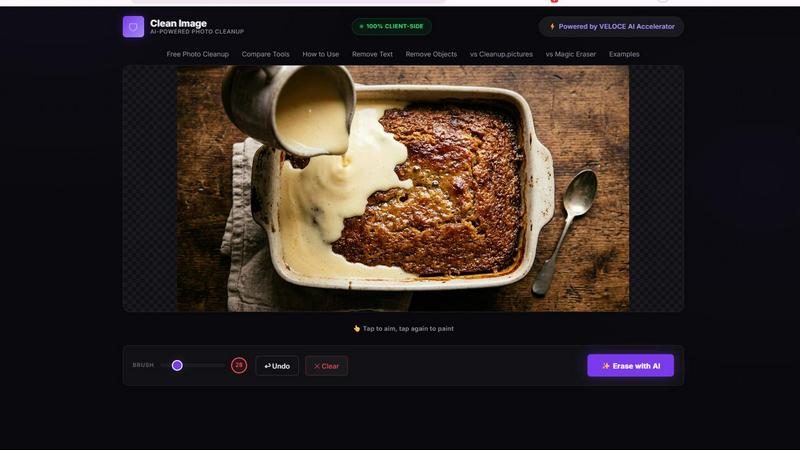
About Clean Image AI-Powered Photo Cleanup
Clean Image AI-Powered Photo Cleanup is a revolutionary browser-based tool that leverages artificial intelligence to remove unwanted elements from your photographs. Unlike traditional photo editing software that requires complex manual work, Clean Image uses advanced inpainting technology to intelligently reconstruct areas of an image after unwanted objects have been removed. The product is designed for anyone who needs to clean up images quickly and efficiently, including content creators, marketers, graphic designers, social media managers, and everyday users who want to remove date stamps, logos, text overlays, or small blemishes from their pictures.
The core value proposition of Clean Image lies in its uncompromising commitment to privacy and accessibility. All processing happens entirely within your browser using ONNX Runtime Web and WebAssembly. This means your images never leave your device, are never uploaded to any server, and are never stored or transmitted anywhere. There are no accounts to create, no subscriptions to manage, and no data privacy concerns. The tool is completely free for personal projects, making professional-grade AI photo cleanup accessible to everyone. Powered by the VELOCE AI Accelerator and the OpenCV LaMa inpainting model, Clean Image delivers impressive results on images with clean backgrounds, effectively removing text, logos, date stamps, and small imperfections with a simple brush and erase workflow.
Features of Clean Image AI-Powered Photo Cleanup
100% Private Client-Side Processing
All image processing is executed locally on your device using ONNX Runtime Web combined with WebAssembly technology. This architecture ensures that your images never leave your browser, are never uploaded to any external server, and are never stored in any cloud database. Your privacy is guaranteed by design, making Clean Image ideal for handling sensitive or confidential visual content without any risk of data exposure or unauthorized access.
AI-Powered Inpainting with OpenCV LaMa
The tool utilizes the sophisticated OpenCV LaMa neural network model to perform intelligent image reconstruction. When you brush over an area containing unwanted content, the AI analyzes the surrounding pixels, textures, colors, and patterns to generate a seamless replacement. This inpainting process goes beyond simple cloning or patching, producing natural-looking results that blend perfectly with the rest of the image, especially effective for removing text overlays, logos, and date stamps.
Instant Performance After Initial Load
The AI model, approximately 89 MB in size, downloads once during your first visit and is then cached directly in your browser. On subsequent visits, the tool loads instantly with zero additional data usage. This caching mechanism ensures that after the one-time setup, you can clean images repeatedly without waiting for model downloads, making the tool highly efficient for regular use and batch processing of multiple images.
Simple and Intuitive Brush and Erase Workflow
Clean Image features a straightforward user interface built around a brush tool. You simply paint over the unwanted elements in your image, such as text, logos, or blemishes, and then click the erase button. The AI handles the complex reconstruction automatically. This one-click erase approach eliminates the need for layer management, selection tools, or manual retouching skills, making professional-quality photo cleanup accessible to users of all technical levels.
Use Cases of Clean Image AI-Powered Photo Cleanup
Removing Watermarks and Logos from Images
Content creators and designers often need to remove watermarks or logos from stock images, screenshots, or reference photos. Clean Image excels at this task when the background is relatively clean and uniform. Simply brush over the watermark or logo, and the AI inpainting model reconstructs the area using surrounding pixel data, leaving no trace of the original overlay. This is particularly useful for creating clean mockups, presentations, or personal design projects.
Eliminating Date Stamps and Timestamps from Photos
Many digital cameras and smartphones automatically add date stamps to photos, which can be distracting or undesirable for professional use. Clean Image allows you to quickly remove these timestamps without needing to crop the image or use complex cloning tools. The AI effectively analyzes the area around the date stamp and fills it with appropriate background content, restoring the natural appearance of your photograph in seconds.
Cleaning Up Social Media Graphics and Banners
Social media managers and marketers frequently work with templates that may contain outdated text, promotional codes, or branding elements that need to be refreshed. Clean Image enables rapid cleanup of these graphics by removing specific text or design elements. Since social media graphics often have clean backgrounds, the tool delivers excellent results, allowing for quick iteration and repurposing of visual assets without starting from scratch.
Removing Small Blemishes and Unwanted Objects
For personal photography and casual image editing, Clean Image is highly effective at removing small imperfections such as dust spots, sensor artifacts, temporary objects, or minor blemishes from portraits. The tool works best on clean backgrounds where the unwanted element is clearly distinct from the surrounding area. This use case is perfect for hobbyists and casual users who want to enhance their photos without learning professional editing software.
Frequently Asked Questions
Is Clean Image really free to use?
Yes, Clean Image is completely free to use for personal projects. There are no hidden fees, subscription plans, or paywalls. The tool is designed to be accessible to everyone, and you can use it as many times as you like without any cost. The only requirement is a modern web browser that supports WebAssembly and ONNX Runtime Web.
Does Clean Image store or upload my images anywhere?
No, absolutely not. All image processing happens locally within your browser using ONNX Runtime Web and WebAssembly. Your images never leave your device, are never uploaded to any server, and are never stored or transmitted anywhere. This privacy-first architecture ensures that your visual data remains completely under your control at all times.
What types of images work best with Clean Image?
Clean Image delivers the best results on images with clean, uniform backgrounds that contain text overlays, logos, date stamps, or small blemishes. The AI inpainting model performs optimally when the area to be removed is clearly distinguishable from the surrounding content. Complex backgrounds with intricate patterns, textures, or multiple objects may produce less satisfactory results.
How does the AI model work after the first use?
During your first visit, the AI model (approximately 89 MB) is downloaded and cached in your browser. On subsequent visits, the model loads instantly from the cache with zero additional data usage. This means the tool becomes faster and more efficient the more you use it, requiring no repeated downloads or data consumption after the initial setup.
Explore more in this category:
Similar to Clean Image AI-Powered Photo Cleanup

AIPetGen turns a photo of your dog, cat, or other pet, or a written description, into a new picture or a short animation.


Free online screen test — diagnose dead pixels, lines, color issues & flicker. No download.

Chat with random strangers online for free on ChatIt.me. Enjoy safe, anonymous, and instant 1-on-1 conversations with people worldwide