
CustomTattoo AI
CustomTattoo AI generates, saves, and previews your tattoo ideas on real skin so you can confidently bring artist-ready concepts to your appointment.
Visit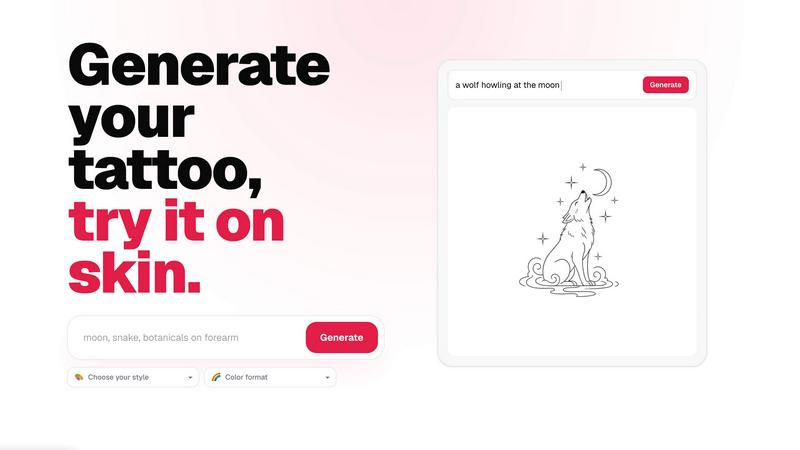
About CustomTattoo AI
CustomTattoo AI is a specialized, AI-powered platform designed to transform how people plan, design, and visualize their next tattoo. The product serves as a comprehensive digital studio where users can move from a vague idea to a polished, artist-ready design concept. At its core, the platform allows users to describe their tattoo idea in natural language, select from a wide range of artistic styles and color formats, and generate custom, unique tattoo concepts in seconds. What truly sets CustomTattoo AI apart is its integrated on-skin preview feature, which lets users upload a photo of themselves and see exactly how the generated design will look on their own body, considering placement and scale. The platform is built for first-time tattoo clients who may feel uncertain about committing to a permanent design, as well as seasoned tattoo enthusiasts looking to explore new styles or refine a specific concept. It offers a personal library for saving and comparing multiple designs, enabling users to test different styles, placements, and moods before making a final decision. The main value proposition is clarity and confidence; by the time a user walks into a tattoo studio, they have a clear visual direction and a concrete reference image, reducing miscommunication and ensuring the final result matches their vision. CustomTattoo AI is not a marketplace for booking artists but a creative tool that empowers users to take control of their tattoo planning process. It is free to start with three initial credits, allowing anyone to test the generator and preview their first design without any financial commitment or hidden subscriptions. The platform also includes a comprehensive library of tattoo ideas, style guides, and placement suggestions, making it a complete resource for anyone considering a new tattoo.
Features of CustomTattoo AI
AI-Powered Tattoo Generator
Users can describe their tattoo idea in plain text, specifying the subject, desired mood, and preferred placement. The AI then interprets this brief and generates a unique, custom tattoo concept. Users can further refine the output by selecting from a variety of artistic styles, such as Gothic blackwork, traditional, watercolor, or geometric, and choosing a color format like black and grey, full color, or sepia. This feature allows for rapid exploration of different creative directions from a single initial idea.
On-Skin Try-On Preview
This is a core differentiator for the platform. After generating a design, users can upload a clear photo of the body part where they intend to get the tattoo. The AI then uses advanced image processing to map the generated design onto the user's skin, accurately simulating placement, scale, and how the design follows the body's natural contours. This provides a realistic preview that is invaluable for assessing size and position before any permanent commitment.
Personal Design Library and Comparison
CustomTattoo AI provides each user with a personal library where they can save all their generated designs and on-skin previews. This library acts as a curated collection of ideas, allowing users to easily compare different styles, color formats, and placements side-by-side. It serves as a visual mood board that helps users narrow down their preferences and build a strong, cohesive direction for their final tattoo.
Artist-Ready Direction Export
The platform is designed to bridge the gap between the user's vision and the tattoo artist's execution. Each generated design and preview can be exported as a clear, high-quality reference image. This "artist-ready direction" includes the specific style and color choices, providing the tattoo artist with an unambiguous visual brief. This reduces back-and-forth communication and helps ensure the final tattoo closely matches what the user envisioned.
Use Cases of CustomTattoo AI
First-Time Tattoo Planning
For individuals getting their first tattoo, the decision can be overwhelming. CustomTattoo AI allows them to explore a wide range of styles and concepts without pressure. They can describe a general idea, generate multiple options, and preview them on their own skin to see what feels right. This builds confidence and helps them articulate their vision clearly to a professional artist, reducing anxiety about the permanence of the decision.
Exploring Multiple Artistic Styles
A user might have a core concept, like a crescent moon with botanicals, but be unsure of the best artistic style to bring it to life. With CustomTattoo AI, they can generate the same concept in different styles, such as fine line, neo-traditional, or watercolor, and compare the results. This use case empowers users to step outside their comfort zone and discover styles they may not have previously considered.
Testing Tattoo Placement and Scale
Placement is a critical factor in a tattoo's final appearance. A design that looks great on a flat screen might not translate well to a curved forearm or a shoulder blade. Users can use the on-skin preview to test the same design on different body parts, adjusting the scale to see how it fits. This helps avoid common pitfalls like designs that are too small to hold detail or placed in a way that distorts the image.
Creating a Collaborative Brief for an Artist
Many tattoo artists appreciate when a client comes prepared with a clear reference. A user can use CustomTattoo AI to generate a design that captures the essence of their idea, then present this printout or digital file to their artist. This serves as a starting point for collaboration, allowing the artist to add their professional touch while ensuring the core concept is understood. It streamlines the consultation process and leads to more satisfying results.
Frequently Asked Questions
Is CustomTattoo AI free to try?
Yes, CustomTattoo AI offers a free trial. When you sign up for an account, you are given 3 free credits immediately. These credits allow you to generate designs and use the on-skin preview feature without needing to provide any payment information. This lets you test the platform and see the quality of the results before deciding to purchase more credits.
How does the on-skin preview work?
The on-skin preview feature uses AI to map a generated tattoo design onto a photo of your own body. You simply upload a clear, well-lit photo of the area where you want the tattoo, such as your arm or leg. The AI then analyzes the photo to understand the surface and contours, and it realistically places the design onto your skin, simulating how it would look in terms of size, placement, and perspective.
Will there be hidden subscriptions?
No, CustomTattoo AI operates on a simple credit-based system, not a subscription model. You purchase credits as you need them, and they do not expire. There are no recurring charges or hidden fees. You have full control over your spending, and you only pay for the designs you generate. The platform is transparent about its pricing from the start.
Can I take the design to my tattoo artist?
Yes, absolutely. The designs and previews you generate on CustomTattoo AI are intended to be used as reference material for your tattoo artist. You can save and export the images to show your artist the style, composition, and placement you have in mind. This provides a clear visual brief that helps you and your artist communicate effectively, leading to a more accurate and satisfying final tattoo.
Similar to CustomTattoo AI

Chat with random strangers online for free on ChatIt.me. Enjoy safe, anonymous, and instant 1-on-1 conversations with people worldwide

EffectSnap is a free online motion graphics toolkit for video editors. Create, customize, and export eye-catching motion effects, animations, transiti

AI-native presentation and visual content platform that turns prompts, documents, images, videos, and data into polished, shareable decks.

Vidhyagen is an all-in-one platform for fast image conversion, background removal, and smart image processing tools.

Free AI anime wallpaper generator. Create original HD anime wallpapers and avatars from text prompts.

PerchanceAI is a free AI video generator and a free AI image generator with no sign-up required.


401k Calculator.info is a free online tool to estimate retirement savings, employer match, and future 401(k) growth for smarter financial planning.