
JustPDF
JustPDF is a privacy-first, browser-based toolkit offering 17 free PDF tools for merging, compressing, and converting files without uploads.
Visit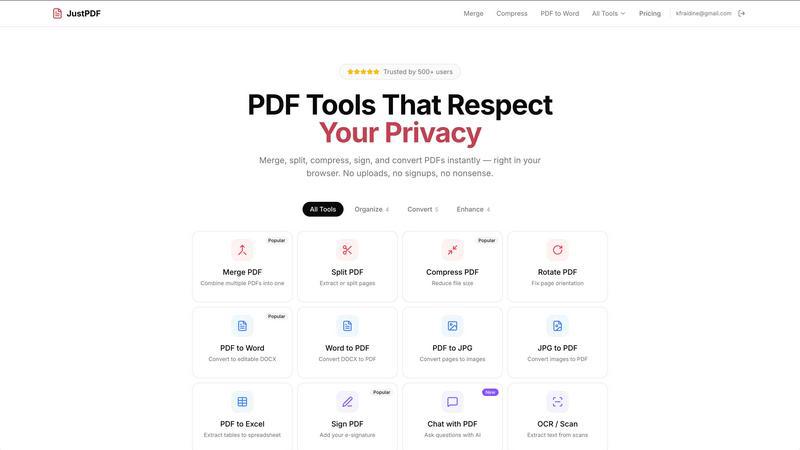
About JustPDF
JustPDF is a cutting-edge online PDF tool that offers 17 professional-grade PDF functionalities, all executed directly within the user's browser. This unique approach distinguishes JustPDF from other popular online PDF services like Smallpdf and iLovePDF, which typically require file uploads to remote servers. By leveraging JavaScript and WebAssembly, JustPDF ensures that all operations are performed locally on the user's device, guaranteeing that sensitive files remain private and secure. Users can easily merge, split, compress, rotate, and convert PDFs without the need for an account, making it accessible to everyone. The tool is particularly valuable for students and educators, as it is FERPA-compliant for educational use. With a free tier allowing three operations per day, users can explore its features without commitment. For those seeking unlimited access, a Pro plan is available starting at just $4 per month. JustPDF is designed for anyone needing reliable and efficient PDF solutions, prioritizing user privacy and convenience.
Features of JustPDF
Merge PDF
The Merge PDF feature allows users to combine multiple PDF documents into a single file seamlessly. This tool is perfect for organizing reports, presentations, or any multi-part documents, ensuring that all related information is consolidated in one easy-to-manage file.
Compress PDF
With the Compress PDF function, users can reduce the file size of their PDFs quickly and efficiently. This feature is especially useful for individuals needing to share large documents via email or upload them to a website, as it helps maintain quality while minimizing storage and bandwidth requirements.
PDF to Word
The PDF to Word feature enables users to convert their PDF files into editable DOCX format. This is particularly beneficial for those who need to modify text, images, or other content in their PDFs, streamlining the editing process without the hassle of retyping or formatting.
Chat with PDF (AI)
The innovative Chat with PDF feature utilizes AI to facilitate interactive queries about the content of a PDF. This tool allows users to ask questions and receive answers based on the document's information, making it easier to extract relevant data and insights without manually sifting through pages.
Use Cases of JustPDF
Academic Research
Students and researchers can utilize JustPDF to manage their academic documents efficiently. The ability to merge, split, and convert PDFs allows for effective organization of research papers, articles, and notes, enhancing productivity and collaboration in academic settings.
Business Documentation
Professionals can leverage JustPDF for handling business documents such as contracts, proposals, and reports. With features like PDF compression and signing, users can ensure their documents are not only polished and professional but also secure and easily shareable.
Creative Projects
Graphic designers and content creators can benefit from JustPDF's ability to convert various image formats to PDF and vice versa. This feature helps to compile portfolios or presentations, allowing for a cohesive and visually appealing format that is easy to distribute.
Personal Use
Individuals can use JustPDF for everyday tasks such as managing personal documents, receipts, and forms. The tool's user-friendly interface and privacy-focused functionality make it ideal for anyone looking to streamline their document handling without compromising security.
Frequently Asked Questions
Is JustPDF free to use?
Yes, JustPDF offers a free tier that allows users to perform three operations per day without any need for registration or account creation, making it accessible to everyone.
Do I need to upload my files to use JustPDF?
No, JustPDF processes all operations locally in the user's browser using JavaScript and WebAssembly, ensuring that your files never leave your device and maintaining your privacy.
What types of file conversions does JustPDF support?
JustPDF supports a variety of conversions, including PDF to Word, Word to PDF, JPG to PDF, PDF to JPG, PDF to Excel, and more, enabling users to work with different file formats easily.
Is JustPDF compliant with educational privacy regulations?
Yes, JustPDF is FERPA-compliant, making it a suitable choice for educational use where the privacy of student information is paramount. This ensures that educational institutions can use its tools without concerns about data security.
Explore more in this category:
Similar to JustPDF

ROIpad turns positioning into a data-driven science. Track competitor moves and live market signals to find exact high-converting messaging gaps.

All-in-one POS, inventory, accounting and HR software for Bangladeshi SMEs — real-time sales, stock and finance in one place.

AI meeting notes, transcripts, summaries and action items on iPhone, iPad and Android.

ButterShare is a browser-based peer-to-peer file transfer tool that lets you send large files and folders directly between devices without signup or c

Free light screen tool online. Turn any display into a flashlight, ambient light, or solid-color screen. No download or sign-up.

AI Email Filter sorts incoming mail into folders using plain-language prompts you write. Works with any IMAP mailbox; bring your own LLM if you want.

LeadsReddit helps founders, marketers, and sales teams find people on Reddit who are actively looking for what they sell. Instead of scrolling through

A free launch checklist for SaaS, apps, AI tools and more. Every step says why it matters and when you can skip it.