
Meme Library
Meme Library is a free, private meme organizer that lets you search memes by text inside images and save from anywhere with backup and restore.
Visit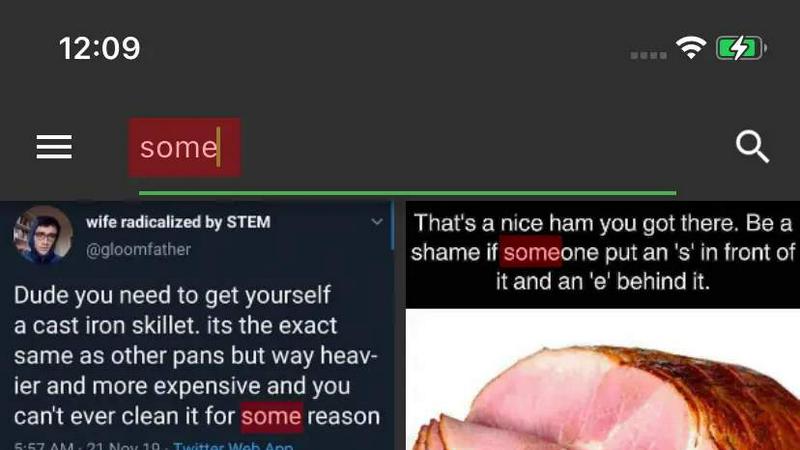
About Meme Library
Meme Library is a dedicated, private, and searchable application designed to serve as the definitive home for your personal meme collection. In an age where digital humor, reaction images, and niche internet jokes are integral to communication, managing these assets can become chaotic. This tool solves the common problem of endlessly scrolling through a cluttered camera roll or a disorganized folder of screenshots to find the perfect reaction. Meme Library allows users to save memes directly from their camera roll or from popular websites like Instagram, Reddit, and general web browsers using the share sheet. Once saved, all memes are organized in one clean, lightweight vault. The standout feature is the ability to search memes by the actual text contained within the image, including captions, screenshots of screenshots, and embedded text. This makes recall instantaneous and intuitive. The app is built for everyone from casual users who enjoy sharing a funny image to dedicated meme collectors who maintain vast libraries of reaction images and inside jokes. Privacy is a core pillar; all memes remain on the user's device with no social feed, no forced sharing, and no tracking. For those concerned about data loss, the application offers optional backup and restore functionality, ensuring that a user's carefully curated collection remains safe when upgrading phones or reinstalling the app. It is a fast, focused, and bloat-free solution that transforms a chaotic collection into a usable, searchable, and private personal library.
Features of Meme Library
Text Search Inside Images
This feature allows users to find any meme by searching for the actual text written within the image file. Unlike traditional photo libraries that only search by file name or date, Meme Library uses optical character recognition to index the text visible in screenshots, captions, and even screenshots of screenshots. This means you can search for a specific quote, a funny misspelling, or a common reaction phrase like "this is fine" and instantly retrieve the correct image from your entire collection. It eliminates the frustration of manually scrolling through hundreds of images to find a specific joke.
Save From Anywhere
Meme Library integrates deeply with your device's operating system to accept memes from virtually any source. Users can save images directly from Instagram, Reddit, Twitter, or any web browser using the standard share sheet functionality. Additionally, you can import directly from your device's camera roll or gallery. This seamless import process ensures that whenever you encounter a meme worth keeping, it can be added to your organized library in just a couple of taps, without requiring manual downloads or complex file management.
Backup and Restore
Data security is a primary concern for any collector, and this feature provides peace of mind. Meme Library offers a secure, optional backup system that allows users to save their entire collection to the cloud. If a user upgrades to a new phone, experiences a device failure, or needs to reinstall the app, the restore function can bring back the complete library, including all images and their associated searchable text indexes. This ensures that years of curated content are never lost and remain accessible across device transitions.
Lightweight and Clean Interface
The application is built without unnecessary bloat, advertisements, or complex menus. It is a fast, focused meme vault designed for quick access and efficient management. The user interface is clean and intuitive, allowing for rapid browsing, sorting, and sharing of memes. This design philosophy ensures that the app does not slow down the user's device and that the primary task—finding and using a meme—is accomplished with minimal friction. The experience is purely functional, prioritizing speed and ease of use above all else.
Use Cases of Meme Library
Finding the Perfect Reaction Meme in Seconds
A user is in a group chat and needs a specific reaction meme, such as "Disaster Girl" or "Distracted Boyfriend," but cannot remember where they saved it. Instead of scrolling through months of camera roll history, they open Meme Library and type a keyword like "disaster" or "boyfriend" into the search bar. The app instantly displays the exact image, allowing the user to share it immediately. This use case highlights the core value of rapid recall for digital communicators.
Organizing a Large Collection of Niche Jokes
A dedicated meme collector has amassed thousands of images spanning years, including inside jokes from specific online communities, obscure references, and personal screenshots. Without organization, this collection is unusable. Using Meme Library, they can save all images and rely on the text search to find specific jokes by the text within the image. They no longer need to create complex folder structures, as the search functionality effectively organizes the collection by content.
Migrating a Meme Collection to a New Phone
A user is upgrading to a new smartphone and is worried about losing their carefully curated meme library. They use the Backup feature within Meme Library to securely upload their entire collection to the cloud. After setting up their new device and installing the app, they use the Restore function to download all images and their search indexes. The entire collection is now available on the new phone exactly as it was on the old one, preserving years of digital history.
Saving Memes from Multiple Social Platforms
An active user frequently encounters share-worthy memes on Instagram, Reddit, and Twitter throughout the day. Instead of downloading each image manually to their camera roll, they use the share sheet integration of Meme Library. With a few taps, they send the meme directly from the social media app into their organized vault. This streamlines the saving process, ensuring that memes from various sources are automatically collected in one searchable location without cluttering the main photo gallery.
Frequently Asked Questions
Is my meme collection private and secure?
Yes, privacy is a fundamental design principle of Meme Library. All memes you save are stored locally on your device. The application does not upload your images to any social feed, does not require an account for basic usage, and does not track your activity. There is no forced sharing or data collection for advertising purposes. Your collection remains your own, accessible only by you and through the app.
How does the text search inside images work?
The text search feature uses Optical Character Recognition technology. When you save a meme, the app scans the image for any visible text, such as captions, signs, or dialogue bubbles. This text is then indexed and stored locally on your device. When you perform a search, the app queries this index to find images containing the keywords you typed. This allows you to find memes based on their content, not just their file name or date.
Can I save memes from apps like Instagram or Reddit?
Yes, Meme Library is designed to accept memes from virtually any source. You can save memes directly from Instagram, Reddit, Twitter, web browsers, and your device's gallery. This is typically done through the operating system's share sheet or direct import options. When you see a meme you want to keep, simply use the share function of the source app and select Meme Library as the destination.
What happens to my collection if I delete the app or get a new phone?
If you have enabled the Backup and Restore feature, your collection can be preserved. Before deleting the app or switching phones, you should perform a backup to the cloud. When you install the app on your new device, you can use the Restore function to download your entire collection, including all images and their searchable text indexes. Without a backup, deleting the app will remove all locally stored data.
Explore more in this category:
Similar to Meme Library

Apps and files on an infinite canvas where people and AI agents work together.

ROIpad turns positioning into a data-driven science. Track competitor moves and live market signals to find exact high-converting messaging gaps.

All-in-one POS, inventory, accounting and HR software for Bangladeshi SMEs — real-time sales, stock and finance in one place.

AI meeting notes, transcripts, summaries and action items on iPhone, iPad and Android.

ButterShare is a browser-based peer-to-peer file transfer tool that lets you send large files and folders directly between devices without signup or c

Free light screen tool online. Turn any display into a flashlight, ambient light, or solid-color screen. No download or sign-up.

AI Email Filter sorts incoming mail into folders using plain-language prompts you write. Works with any IMAP mailbox; bring your own LLM if you want.

LeadsReddit helps founders, marketers, and sales teams find people on Reddit who are actively looking for what they sell. Instead of scrolling through