
morsecode-translator
Morse Code Translator lets you encode text, decode Morse from audio or images, and play clean telegraph sounds in one focused workspace.
VisitPublished on:
July 4, 2026
Pricing:
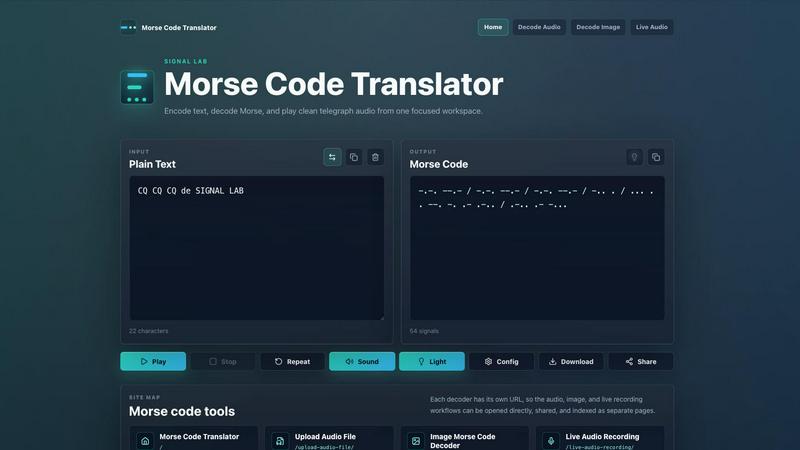
About morsecode-translator
The morsecode-translator is a comprehensive, browser-based workspace designed for encoding plain text into Morse code, decoding Morse code back into readable text, and playing authentic telegraph audio. This tool serves as a centralized hub for anyone who needs to work with Morse code, whether for educational purposes, amateur radio operations, historical research, or practical signaling applications. The product combines a clean, focused interface with powerful audio and visual features, allowing users to translate messages seamlessly between text and Morse signals. It supports International Morse code standards, providing accurate character mapping for letters, numbers, and common punctuation. Beyond simple translation, the tool offers advanced capabilities such as configurable playback speed measured in words per minute (WPM), adjustable tone frequency and volume, and a synchronized light cue that flashes in time with each dot and dash. Users can also download their translated Morse code as a WAV audio file for offline use or sharing. The workspace is structured around an input panel for plain text or Morse code and an output panel that displays the corresponding translation, character count, and signal count. Additional dedicated decoder pages handle audio file uploads, image-based Morse extraction, and live microphone recording, each with its own unique URL for direct access and sharing. This makes morsecode-translator an essential tool for radio enthusiasts, students learning Morse code, educators teaching communication history, and hobbyists exploring signal processing.
Features of morsecode-translator
Text to Morse Encoding and Decoding
The core functionality of morsecode-translator allows users to type plain text and instantly see the corresponding International Morse code output, with characters separated by a single space and words separated by a forward slash. The translator supports letters, numbers, and common punctuation, rendering them as precise sequences of dots and dashes. Conversely, users can switch the input mode to paste or type Morse code, and the tool will decode it back into readable plain text. Unsupported tokens or characters are clearly marked with a hash symbol, ensuring that users can identify and correct any input errors. The system provides real-time character and signal counts for both input and output, giving users immediate feedback on the length and complexity of their message.
Audio Playback with Configurable Timing
The morsecode-translator includes a sophisticated audio playback engine that uses the browser's Web Audio API to generate clean telegraph tones that mimic the sound of a traditional Morse code receiver. Users can adjust the playback speed using a words per minute (WPM) control, which proportionally shortens or lengthens the duration of dots, dashes, and the gaps between them. The tone frequency is configurable to match personal preference or to simulate different radio equipment, and the volume can be set independently. A repeat function allows the signal to be played continuously for practice or verification, while a stop button provides immediate silence. This feature is essential for learning to recognize Morse code by ear rather than by visual counting.
Synchronized Visual Light Cue
To complement the audio playback, the translator offers an optional light cue that flashes in perfect synchronization with every dot and dash being played. This visual indicator provides a dual-channel learning experience, allowing users to see the timing of each signal as they hear it. The light cue is particularly helpful for beginners who are still developing their aural recognition skills, as it reinforces the relationship between the visual representation of Morse code and its auditory rhythm. It also serves as a practical tool for demonstrating Morse code in presentations or educational settings where audio alone may not be sufficient.
Multi-Format Decoder Pages
Beyond the primary text-based translator, morsecode-translator provides three specialized decoder pages, each with its own dedicated URL for direct access and sharing. The audio file decoder accepts uploaded WAV, MP3, M4A, OGG, and other browser-supported audio formats, extracting Morse code signals from recorded transmissions. The image decoder analyzes high-contrast images to identify and extract visible dots and dashes, then decodes them into a message. The live audio recording feature listens through the user's microphone, building a real-time transcript of Morse code tone pulses. This multi-format approach ensures that users can decode Morse code from virtually any source.
Use Cases of morsecode-translator
Amateur Radio Communication and Practice
Amateur radio operators, commonly known as ham radio enthusiasts, frequently use Morse code for long-distance communication, especially on bands where voice signals are weak or bandwidth is limited. The morsecode-translator provides these operators with a reliable tool for encoding messages before transmission and decoding received signals after recording. The configurable WPM speed allows operators to practice at their current skill level and gradually increase speed as they improve. The audio playback feature with adjustable tone helps operators train their ears to recognize different signal characteristics, while the light cue offers a visual backup for verifying timing. This tool is invaluable for both active operators and those studying for licensing exams that require Morse code proficiency.
Educational Instruction in Communication History
Teachers and educators in history, technology, and communications courses can use morsecode-translator to demonstrate the principles of early digital communication to students. The tool makes abstract concepts like encoding, decoding, and signal timing tangible and interactive. Students can type their own messages, hear the resulting telegraph tones, and see the light flash in real time, creating a multisensory learning experience. The examples section provides common historical messages such as SOS and CQ, which help students understand the cultural and practical context of Morse code. The ability to download WAV files allows educators to create custom practice materials for their classes.
Signal Processing and Hobbyist Projects
Hobbyists and makers working on electronics or signal processing projects can use morsecode-translator as a testing and verification tool. For example, someone building a Morse code decoder circuit can generate known test signals using the translator's audio output and compare them against their circuit's output. The image decoder is particularly useful for extracting Morse code from photographs of old telegraph equipment, historical documents, or scanned images of signal lights. The live audio recording feature can be used to capture and analyze Morse code from old radio broadcasts, movies, or other media, making it a versatile tool for researchers and enthusiasts.
Accessibility and Assistive Communication
Morse code can serve as an alternative communication method for individuals with certain disabilities, such as those who have limited mobility or speech impairments. The morsecode-translator provides a low-barrier entry point for exploring this form of communication. Users can type messages using standard input methods and have them converted to Morse code, which can then be played as audio or light signals. Conversely, Morse code input from specialized switches or adaptive devices can be decoded into text for reading. The tool's clear visual interface and configurable audio settings make it adaptable to various user needs and preferences.
Frequently Asked Questions
What is the difference between a dot and a dash in Morse code timing?
In Morse code, a dot is the fundamental unit of time, and a dash is exactly three times longer than a dot. The gap between dots and dashes within a single character is equal to the length of one dot. The space between characters is three dots long, and the space between words is seven dots long. The words per minute (WPM) setting in the translator adjusts the duration of the dot unit, which proportionally changes all other timing elements. When you increase the WPM, dots, dashes, and all gaps become shorter, making the signal faster.
How do I decode Morse code from an audio file using this tool?
To decode Morse code from an audio file, navigate to the dedicated "Upload Audio File" page using its unique URL. Click the upload button or drag and drop your audio file onto the designated area. The tool supports common browser-compatible formats such as WAV, MP3, M4A, and OGG. Once the file is loaded, the decoder will analyze the audio waveform, identify the tone pulses representing dots and dashes, and generate a text transcript of the decoded message. For best results, ensure the audio file has a clear, consistent tone with minimal background noise.
Can I share a specific translation with someone else?
Yes, the morsecode-translator allows you to share translations easily. Each of the decoder pages has its own unique URL, so you can send a direct link to the audio file decoder, image decoder, or live audio recorder. For the main text translator, you can generate a shareable URL that includes the plain text message you have entered. Additionally, you can download the translated Morse code as a WAV audio file and share that file directly, or copy the translated text output and paste it into an email, message, or document.
What does the hash symbol mean in the decoded output?
The hash symbol appears in the decoded output when the translator encounters a character or token that is not supported by its International Morse codebook. This can happen if you paste Morse code that contains invalid sequences, or if the plain text input includes special characters that do not have a Morse code equivalent. The hash marker is placed at the position of the unsupported element, allowing you to identify and correct the issue. Common unsupported characters include some punctuation marks, symbols like @ or #, and characters from non-Latin alphabets.
Similar to morsecode-translator

AIPetGen turns a photo of your dog, cat, or other pet, or a written description, into a new picture or a short animation.

AI meeting notes, transcripts, summaries and action items on iPhone, iPad and Android.


