
Photo Animate
Photo Animate uses advanced AI to transform your static photos into lifelike, animated videos with natural motion in just one click.
Visit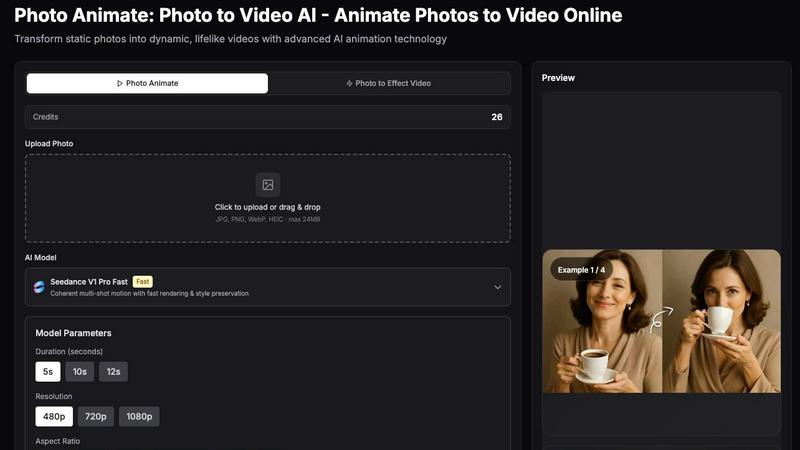
About Photo Animate
Photo Animate is a sophisticated AI-powered platform designed to transform static photographs into dynamic, lifelike videos. At its core, this tool serves as an advanced image-to-video AI that breathes motion into still images, making it an essential resource for anyone looking to animate photos with natural, believable results. The product is built around a simple yet powerful workflow: users upload a photo, describe or select the desired motion, and the AI generates a short, expressive video clip. This process is facilitated by a range of AI models, including the Seedance V1 Pro Fast, which offers coherent multi-shot motion, fast rendering, and excellent style preservation. Photo Animate is for a diverse audience, including families wanting to bring old memories to life, content creators seeking unique visual assets, and individuals working on memorial projects. The main value proposition lies in its ability to create natural-looking motion, such as blinking, smiling, and subtle head movements, that retains the original feeling and integrity of the photograph. Unlike complex video editing software, Photo Animate offers a simple, accessible image-to-video AI workflow that requires no advanced editing skills, making it the easiest way to bring photos to life. The platform also includes a suite of additional video tools, such as an old photo animator and an AI dance generator, further expanding its creative capabilities. By focusing on emotional and practical use cases, Photo Animate positions itself as a meaningful tool for storytelling, memory preservation, and modern content creation.
Features of Photo Animate
Natural Portrait Motion
Photo Animate excels at generating believable, subtle facial movements specifically designed for portraits. The AI can create blinking eyes, gentle smiles, and soft head movements that look far more natural than generic animation effects. This focus on realistic motion ensures that the animated video preserves the emotional essence and character of the original photograph, making it ideal for family memories, memorial projects, and any scenario where authenticity is paramount. The motion is not overdone, providing a respectful and lifelike result.
Old Photo Friendly Workflow
The platform is uniquely optimized for working with vintage and restored images. Users can upload faded portraits, black and white snapshots, or old family photos, and the AI is adept at handling the unique challenges these images present, such as lower resolution or less clarity. By allowing users to first restore or enhance a photo, then animate it, Photo Animate provides a seamless workflow for bringing historical images to life. This feature makes it a powerful tool for genealogists, historians, and families looking to connect with their past.
Simple Image to Video AI Workflow
Photo Animate is designed for ease of use, requiring no prior video editing experience. The process is streamlined into three simple steps: upload a photo, describe or select the desired motion using a prompt or pre-built templates, and generate the video. The interface is intuitive, with clear options for duration, resolution, and aspect ratio. This simplicity allows anyone, from tech-savvy creators to casual users, to create professional-looking animated videos in minutes, democratizing access to advanced AI animation technology.
Diverse AI Models and Templates
The platform offers a variety of AI models and pre-built motion templates to cater to different creative needs. Users can choose from models like Seedance V1 Pro Fast for quick, coherent results. Additionally, a library of templates such as "Dance," "LoveHeart," "Walking," and "Hugging" provides instant starting points for common animation styles. This diversity allows users to quickly apply specific motions without needing to craft detailed text prompts, speeding up the creative process and inspiring new ideas.
Use Cases of Photo Animate
Bring Old Family Photos to Life
Photo Animate is an excellent tool for animating cherished family memories. Users can upload faded portraits, wedding photos, or childhood snapshots and transform them into short, expressive videos. The AI adds gentle, natural motion like blinking and smiling, making the people in the photos feel more present and alive. This is perfect for creating emotional slideshows for family gatherings, sharing memories on social media, or simply reconnecting with the past in a vivid, new way.
Animate Deceased Loved Ones Photos
For remembrance projects and family storytelling, Photo Animate provides a respectful way to create motion from treasured memories of deceased loved ones. The tool can generate subtle eye, smile, and head movements that are designed to be gentle and natural, avoiding any gaudy or disrespectful effects. This allows families to create meaningful video clips for memorial services, digital memory books, or personal keepsakes, offering a unique way to honor and remember those who have passed.
Animate Old Black and White Photos
The platform is particularly effective for bringing vintage and historical photographs to life. Users can start with restored black and white images, and the AI can generate motion that helps these old memories feel vivid again. By improving facial clarity and adding natural movement, Photo Animate bridges the gap between the past and the present, allowing users to see ancestors and historical figures move in a way that was previously impossible, without over-editing the original photo's character.
Create Fun and Engaging Content for Social Media
Beyond emotional and memorial use cases, Photo Animate is a powerful tool for modern content creators. The platform's AI dance generator and hug generator allow users to turn any portrait into a fun, realistic dance video or create heartwarming hug videos from two photos. These features are perfect for creating viral social media content, personalized greetings, or unique marketing materials that stand out. The ability to quickly generate engaging, animated visuals provides a significant advantage for creators looking to capture audience attention.
Frequently Asked Questions
What types of photos can I animate with Photo Animate?
Photo Animate supports a wide range of image formats, including JPG, PNG, WebP, and HEIC, with a maximum file size of 24MB. It is designed to work with various photo types, from modern digital portraits to old, faded, and black and white photographs. For best results, especially with vintage photos, it is recommended to first restore or enhance the image to improve facial clarity before uploading it to the platform for animation.
How long does it take to generate an animated video?
The generation time depends on the selected AI model and video parameters. The Seedance V1 Pro Fast model is designed for quick rendering, allowing users to preview and download their animated video in a relatively short time. Users can also choose the video duration, with options of 5, 10, or 12 seconds. The platform provides a preview before final download, ensuring the motion meets expectations.
Can I control the type of motion in the animation?
Yes, Photo Animate offers multiple ways to control the motion. Users can write a text prompt of up to 500 characters to describe the desired movement. Alternatively, the platform provides a library of pre-built templates, such as "Dance," "Walking," and "Hugging," which can be applied with a single click. This flexibility allows for both precise, custom animations and quick, template-based results.
Do I need any video editing experience to use Photo Animate?
No, Photo Animate is designed for users of all skill levels. The workflow is intentionally simple and intuitive: upload a photo, choose or describe the motion, and generate the video. There are no complex editing timelines or technical skills required. The platform handles all the complex AI processing, making it accessible to anyone who wants to create animated videos from still images.
Similar to Photo Animate


Turn videos, images, PDFs, and files into shareable links with fast uploads and privacy-friendly controls.

Turn TikTok, Reels, Shorts, Facebook videos, audio, and video into accurate timestamped transcripts with TXT, SRT, and VTT exports.

Create product videos manually or let your AI agent control Screen Beaver through MCP—no mouse or keyboard needed.

Create AI videos, images, avatars, and audio in one creative workspace.


Create AI videos from text or images, generate images and audio in one online studio.