
PicExtender
PicExtender uses AI to expand, enhance, and restore images, letting you extend canvases, sharpen details, and revive old photos in one workflow.
Visit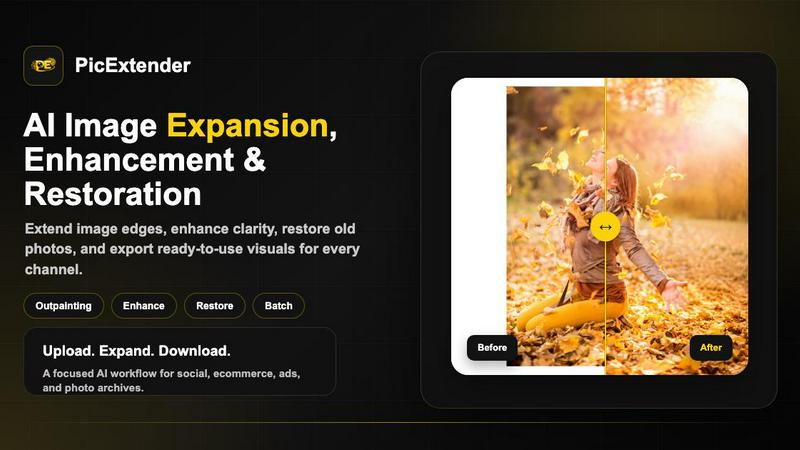
About PicExtender
PicExtender is a comprehensive AI powered image tool that combines expansion, enhancement, and restoration capabilities into a single streamlined workflow. Designed for content creators, marketers, e-commerce professionals, photographers, and anyone who needs to prepare high quality visuals, PicExtender allows users to upload one image and let artificial intelligence complete missing edges, improve clarity, or repair visual damage. The platform supports common image formats including JPG, JPEG, PNG, and WEBP, and delivers results suitable for social media, online commerce, advertising campaigns, and family archives. The core value proposition of PicExtender lies in its ability to bring three essential image editing functions into one focused tool. Users can expand canvas areas with context aware generation that studies edge lighting, colors, and textures before filling new areas with realistic detail. They can enhance image quality by reducing noise, compression artifacts, and softness while keeping results natural. They can also restore damaged old photos by detecting scratches, creases, stains, fading, and blur, then repairing missing areas and recovering detail. PicExtender supports batch outpainting for preparing full product sets or campaign libraries with consistent output settings. The platform offers expandable canvases up to 4096 by 4096 pixels, making it suitable for high resolution creative work across multiple platforms and formats.
Features of PicExtender
Seamless AI Image Expansion
Context aware generation studies the edge lighting, colors, and texture of the original image before filling new canvas areas with realistic detail. This approach ensures that expanded areas blend naturally with the existing content, avoiding the stretched or distorted look common with traditional resizing methods. Users can expand images up to 4K resolution, creating canvases as large as 4096 by 4096 pixels for ads, product pages, stories, banners, and high resolution creative projects. The expansion process preserves subject positioning, lighting direction, and background texture, delivering results that look cohesive and professionally composed.
Efficient Batch Outpainting
PicExtender enables users to prepare a full product set or campaign library with consistent output settings instead of resizing images one by one. This batch processing capability saves significant time for professionals who need to produce multiple expanded images with uniform dimensions and quality standards. The tool applies the same AI expansion parameters across all selected images, ensuring that a complete set of product photos or social media assets maintains visual consistency. Users can upload multiple images, choose their desired output dimensions, and let the system process everything in a single workflow.
AI Image Enhancement and Sharpening
The enhancement feature improves portraits, everyday photos, and low resolution images by reducing noise, compression artifacts, and soft detail while keeping the result natural. For product photography specifically, the tool sharpens lighting, edges, and material detail so packaging, labels, and surface textures look clearer for store listings and campaign assets. This enhancement capability works alongside the expansion and restoration features, allowing users to improve overall image quality as part of their regular workflow without needing separate software.
AI Photo Restoration and Colorization
PicExtender detects scratches, creases, stains, fading, and blur in damaged old photos, then repairs missing areas and recovers detail for family archives and historical images. After completing the repair process, users can also colorize black and white photos by adding natural color to skin, clothing, and environments. This dual capability transforms aged or damaged photographs into vibrant, shareable, and printable memories. The restoration process is designed to handle common forms of photographic degradation while preserving the original character and composition of the image.
Use Cases of PicExtender
Social Media Optimization
Content creators and social media managers can resize and extend images for Instagram, Facebook, LinkedIn, YouTube, and X banners with natural spacing for headlines, buttons, and layouts. PicExtender turns portrait, square, or landscape photos into platform specific covers, banners, posts, and ad formats without stretching people, products, or scenery. The AI expansion adds realistic background areas that match the original image context, making social media assets look professionally designed rather than artificially extended. Users can maintain brand consistency across multiple platforms by applying the same expansion settings to their entire content library.
E-commerce Enhancement
Online retailers and marketplace sellers can keep product details intact while AI expands clean backgrounds and safe margins around their product images. This capability is essential for creating consistent product listings that meet platform requirements for image dimensions and composition. The enhancement feature improves lighting, edges, and material detail so packaging, labels, and surface textures look clearer for store listings and campaign assets. E-commerce professionals can process entire product catalogs using batch outpainting, ensuring every item in their inventory has professionally expanded and enhanced images ready for publication.
Photography Restoration
Photographers and family archivists can recover accidentally cropped edges and rebuild missing visual context around a photo using the AI expansion feature. When combined with the restoration tools, users can repair scratches, creases, stains, fading, and blur in old photographs, then colorize black and white images to bring memories back to life. This use case is particularly valuable for preserving historical family photographs, restoring vintage prints, and preparing images for printing or digital archiving. The tool handles common forms of photographic damage while maintaining the emotional and historical integrity of the original image.
Content Creation for Multiple Platforms
Graphic designers, digital artists, and marketing professionals can extend backgrounds for anime art, cartoons, thumbnails, ads, and design concepts without starting from scratch. PicExtender allows users to upload a source image and describe edits they want, from background replacement and object cleanup to mood, lighting, and campaign ready variants. This flexibility supports rapid iteration for content production, enabling creators to generate multiple versions of an image for A/B testing, platform specific formatting, or creative exploration. The tool reduces the time spent on manual editing while expanding creative possibilities.
Frequently Asked Questions
What image formats does PicExtender support?
PicExtender supports JPG, JPEG, PNG, and WEBP image formats for upload and processing. However, transparent background images are not supported by the platform. Users should ensure their images are in one of the supported formats before attempting to upload them for expansion, enhancement, or restoration. The tool is designed to work with standard image files that contain solid backgrounds or natural scenes.
How large can I expand my images using PicExtender?
PicExtender allows users to expand images up to 4K resolution, creating canvases as large as 4096 by 4096 pixels. This high resolution capacity makes the tool suitable for professional advertising materials, product pages, social media stories, banners, and other high resolution creative work. Users can choose from preset aspect ratios or custom dimensions to match their specific output requirements.
Can I process multiple images at once with PicExtender?
Yes, PicExtender offers efficient batch outpainting capabilities that allow users to prepare a full product set or campaign library with consistent output settings. Instead of resizing images one by one, you can upload multiple images and apply the same expansion parameters across all of them. This batch processing feature ensures visual consistency across your entire image set while saving significant time during production workflows.
Is PicExtender suitable for restoring old or damaged photographs?
Absolutely. PicExtender includes dedicated photo restoration capabilities that detect scratches, creases, stains, fading, and blur in damaged old photos. The AI then repairs missing areas and recovers detail for family archives and historical images. After completing the repair process, users can also colorize black and white photos by adding natural color to skin, clothing, and environments. This makes PicExtender a comprehensive solution for preserving and revitalizing vintage photographs.
Pricing of PicExtender
Basic
$9.9 / month
For light uncropping and daily social assets.
Get
Similar to PicExtender

Free AI video generator: turn text and photos into clips with Sora 2, Veo 3.1 and Wan. No watermark.

Turn a selfie and car photo into a 15-second 24 Card car trend video with AI. No editing, prompts, or subscription.

Apps and files on an infinite canvas where people and AI agents work together.

AIPetGen turns a photo of your dog, cat, or other pet, or a written description, into a new picture or a short animation.

Turn an image into an AI video in seconds. Free to generate, no sign-up. Upload any photo and choose from anime, realistic & cinematic styles.

AI meeting notes, transcripts, summaries and action items on iPhone, iPad and Android.

Provide AI-powered customer support widget for your website
