
ProcessSpy
ProcessSpy is an advanced Mac process monitor with a native interface, real-time filtering, and detailed system insights.
Visit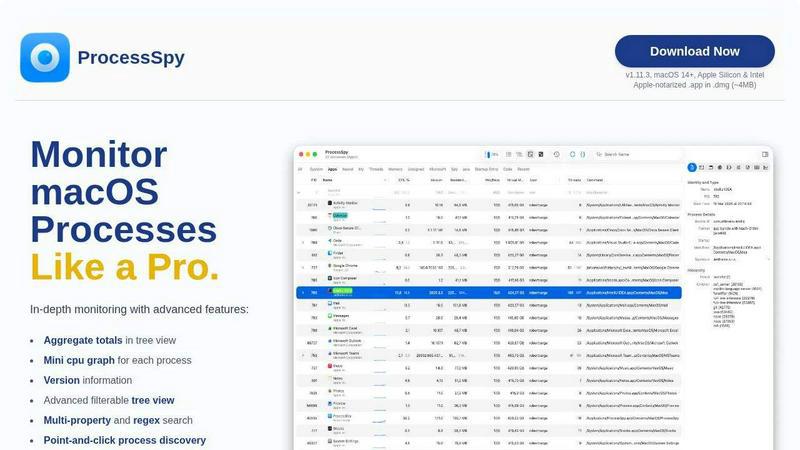
About ProcessSpy
ProcessSpy is a professional-grade process exploration and monitoring utility designed specifically for macOS, serving as a powerful native alternative to tools like Sysinternals Process Explorer for Windows. It addresses the significant limitations of the built-in Activity Monitor by providing deep, granular visibility into every aspect of system and application processes. The tool is engineered for developers, system administrators, IT professionals, and power users who need to go beyond surface-level metrics to diagnose issues, optimize performance, and understand system behavior. Its core value proposition lies in exposing hidden details—such as full command-line arguments, environment variables, open files and network connections, and process hierarchies—that are crucial for debugging and analysis. Built with a focus on macOS integration, ProcessSpy utilizes native APIs and delivers a fast, responsive interface without the bloat of cross-platform frameworks. It effectively transforms opaque process lists into actionable intelligence, enabling users to identify resource hogs, kill unresponsive applications, audit software behavior, and maintain a clear overview of their system's inner workings.
Features of ProcessSpy
Advanced Hierarchical Process Tree
ProcessSpy visualizes processes in a detailed tree view that clearly displays parent-child relationships, making it easy to understand which applications launched which services or sub-processes. Beyond simple visualization, this view includes aggregate totals for CPU usage, memory consumption, and thread counts for entire branches of the tree. This allows you to instantly see the collective resource impact of an application and all its components, a feature completely absent from the native Activity Monitor.
Multi-Property and Regex Search
The tool features a powerful, filterable quick-search system that supports regular expressions and searches across multiple process properties simultaneously. For instance, you can search for processes with "java" in the name and "-Xmx1024m" in their command-line arguments. This precision filtering is invaluable for isolating specific instances of software, especially when dealing with multiple versions of the same runtime, like different JDKs, running concurrently on your system.
JavaScript-Based Custom Filtering
For ultimate control, ProcessSpy allows users to define custom filters using JavaScript. This enables the creation of complex, conditional logic to show or hide processes based on virtually any available property, such as CPU usage thresholds, specific entitlements, bundle identifiers, or process start times. This programmatic approach to filtering offers flexibility far beyond simple text matching.
Comprehensive Process Inspection & History
ProcessSpy provides deep inspection panels for open files, loaded dynamic libraries (Dylibs), and network connections, each with context-menu actions. The paid version unlocks advanced details including environment variables, code signatures, entitlements, Info.plist contents, and startup method. Crucially, it can record historical metrics (CPU, Memory, Threads) and remember finished processes with their full context for later forensic analysis, exporting all historical data to CSV.
Use Cases of ProcessSpy
Debugging and Development
Developers can use ProcessSpy to debug applications by inspecting exact command-line arguments, environment variables, and loaded dependencies. When an app behaves unexpectedly, seeing its full context—such as which specific Java version it's using or what files it has open—can quickly pinpoint configuration errors or resource conflicts that are invisible in standard monitors.
System Performance Analysis and Optimization
System administrators and power users can identify performance bottlenecks by monitoring aggregate resource usage in the process tree and observing real-time mini CPU graphs per process. The ability to track historical metrics helps correlate system slowdowns with specific application activity, enabling targeted optimization and troubleshooting of resource-hungry software.
Security Auditing and Malware Detection
ProcessSpy serves as a security tool by revealing hidden or suspicious processes. Inspecting entitlements, signatures, and startup methods (e.g., LaunchDaemons, LaunchAgents) helps verify software legitimacy. The feature to flag newly discovered processes makes it easier to spot unexpected activity, aiding in the early detection of potentially unwanted programs or malware.
Managing and Terminating Stubborn Applications
When an application becomes unresponsive and refuses to quit through normal means, Activity Monitor often shows an incomplete picture. ProcessSpy allows users to reliably kill stubborn processes by providing the full process tree. You can ensure you terminate all related child processes and daemons, not just the main application window, leading to a cleaner and more effective force-quit.
Frequently Asked Questions
Is ProcessSpy safe to install on my Mac?
Yes, ProcessSpy is completely safe. It is an Apple-notarized application, meaning it has been submitted to and approved by Apple for security and compatibility. It is distributed as a signed .app file inside a .dmg disk image, ensuring its integrity. It runs natively and efficiently on both Intel and Apple Silicon Macs.
What versions of macOS does ProcessSpy support?
ProcessSpy is designed for modern macOS systems. It officially supports macOS 14 (Sonoma) and newer versions, including the latest releases. It leverages newer macOS APIs for its advanced features and does not support older, legacy versions of the operating system.
What is the licensing model for ProcessSpy?
ProcessSpy uses a one-time purchase license model. A single license, priced at $24.99, is valid for one user across an unlimited number of personal devices. This purchase includes lifetime updates, meaning you receive all future feature enhancements and compatibility updates for no additional cost.
What is the difference between the free and paid features?
The free version of ProcessSpy offers robust core functionality, including the advanced tree view, multi-property search, JavaScript filters, basic process information, and point-and-click discovery. The paid license unlocks advanced inspection capabilities like viewing environment variables, entitlements, and code signatures, as well as powerful historical features like process history recording, remembering finished processes, and exporting data to CSV.
Similar to ProcessSpy

ButterShare is a browser-based peer-to-peer file transfer tool that lets you send large files and folders directly between devices without signup or c

Provide AI-powered customer support widget for your website

A human-curated directory for builders. Skip bot-scraped spam and discover verified SaaS apps, practical AI tools, and custom n8n workflows.

A free launch checklist for SaaS, apps, AI tools and more. Every step says why it matters and when you can skip it.

From first scene to published 2D game, no code

Free online screen test — diagnose dead pixels, lines, color issues & flicker. No download.

The #1 Native Form Builder Plugin for Framer - No Code, No Embeds, No External Platforms.

Chat with random strangers online for free on ChatIt.me. Enjoy safe, anonymous, and instant 1-on-1 conversations with people worldwide