
Square Face Generator
Square Face Generator is a free, browser-based avatar maker that lets you mix parts and colors to create cute square icons and download transparent.
Visit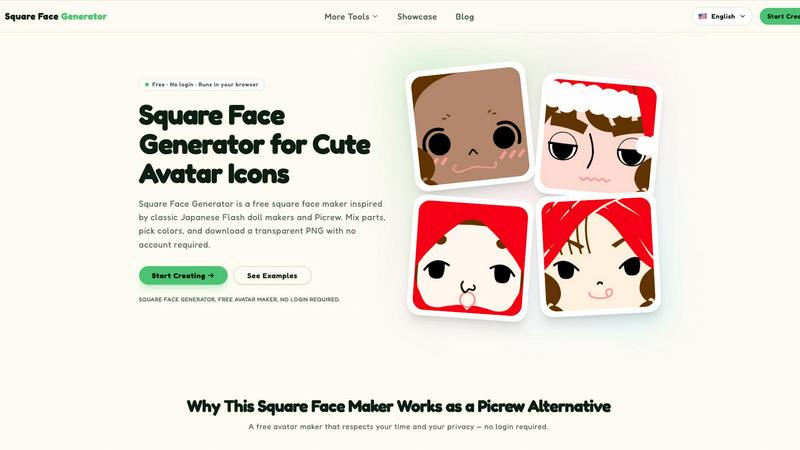
About Square Face Generator
Square Face Generator is a free, browser-based avatar creation tool that specializes in generating charming square-shaped character faces. Inspired by classic Japanese Flash doll makers and the popular Picrew platform, this tool brings the nostalgic experience of digital paper dolls into the modern web browser without requiring any plugins or software installation. The application offers over 200 customizable parts across 12 distinct categories, including skin tones, bangs, side hair, eyes, nose, mouth, eyebrows, eyelashes, blush, glasses, hats, and outfits. With this extensive library of components, users can assemble millions of unique avatar combinations, each with its own personality and style. The tool is designed for anyone who needs a cute, square avatar icon, from individual social media users to game developers and community managers. A key differentiator is its commitment to privacy and simplicity: everything renders locally in the user's browser, meaning no image data ever leaves the device. There is no account creation required, no login process, and no paywalls for any features. The interface is responsive and touch-friendly, working seamlessly across desktop computers, tablets, and smartphones. Users can fine-tune colors using an intuitive color picker with HEX input support, and export their final creation as a transparent 256x256 PNG image with a single click. Square Face Generator is completely free to use, with no watermarks, no usage limits, and no hidden costs, making it an accessible and privacy-respecting alternative to other online avatar makers.
Features of Square Face Generator
Extensive Customization Library
The tool provides over 200 unique parts organized into 12 comprehensive categories, giving users tremendous creative freedom. Categories include skin tones, multiple bang styles, side hair options, various eye shapes, nose designs, mouth expressions, eyebrow styles, eyelash options, blush effects, glasses frames, hat styles, and complete outfits. Each category contains multiple variations, allowing for millions of possible combinations. Users can mix and match parts freely, creating anything from simple, minimalist avatars to complex, detailed character designs.
Real-Time Live Preview
Every change made to the avatar is reflected instantly in a live preview window, providing immediate visual feedback. This eliminates guesswork and allows users to experiment freely with different combinations of facial features, hairstyles, accessories, and colors. The live preview updates as users select new parts, adjust colors, or modify any element, creating an intuitive and responsive design experience. There is no need to refresh the page or wait for rendering, making the creative process smooth and enjoyable.
Local Browser Rendering and Privacy
All image processing and rendering happens entirely within the user's browser, meaning no avatar data, personal information, or image files are ever uploaded to any external server. This local-only operation ensures complete privacy and data security for all users. The tool runs using modern web technologies and is powered by Ruffle for any legacy Flash-based components, eliminating the need for any browser plugins or software downloads. Users can create with complete confidence that their creative work remains on their own device.
One-Click Transparent PNG Export
When the avatar is complete, users can download their creation as a transparent 256x256 PNG image with a single click. This standard size is perfect for social media profile pictures, game avatars, forum icons, and other digital identity purposes. The export process requires no account creation, no email signup, and no payment. The resulting image maintains full transparency, making it easy to place the avatar on any background or integrate it into other design projects without additional editing.
Use Cases of Square Face Generator
Social Media Profile Pictures
Square Face Generator is ideal for creating unique, personalized profile pictures for social media platforms such as Discord, X/Twitter, Instagram, and TikTok. Users can design avatars that reflect their personality, interests, or mood without using a real photograph. The square format is perfectly suited for profile picture slots on most platforms, and the transparent background ensures the avatar integrates seamlessly with any theme or color scheme. Since the tool is free and requires no login, users can create multiple avatars for different accounts or change their look as often as they like.
Game Development Character Assets
Indie game developers and hobbyist creators can use Square Face Generator to quickly produce non-player character portraits, player avatar placeholders, or profile icons for their games. The square format works well for inventory screens, dialogue boxes, and character selection menus. With over 200 customizable parts, developers can generate a diverse cast of characters with distinct appearances without needing artistic skills or expensive design software. The transparent PNG export makes it easy to import assets directly into game engines like Unity, Godot, or GameMaker.
Team and Community Branding
Online communities, gaming guilds, school clubs, and professional teams can use Square Face Generator to create a unified, branded look for their members. By selecting consistent base elements like eye style, outfit color, or accessory type, community leaders can establish a cohesive visual identity while still allowing individual members to personalize their avatars with different hair styles, skin tones, or facial expressions. This balance of uniformity and individuality is perfect for Discord servers, forum communities, and team rosters.
Creative and Educational Projects
Teachers, students, and content creators can incorporate Square Face Generator into slideshows, posters, stickers, school assignments, zines, and other creative projects. The tool provides a quick and easy way to generate custom character illustrations without needing drawing skills or expensive software. The transparent PNG output allows these avatars to be placed into documents, presentations, or digital art compositions seamlessly. The tool's simplicity makes it accessible for children and adults alike, encouraging creativity in educational settings.
Frequently Asked Questions
Is it really free?
Yes, Square Face Generator is completely free to use with no hidden costs, no paywalls, and no premium features locked behind payments. Every part, every color option, and every download is available at no charge. There are no watermarks on exported images, no usage limits, and no requirements to create an account or provide any personal information. The tool is supported through the broader Z-Image platform and remains free for all users.
What size are the exports?
The exported images are 256x256 pixels in PNG format with a transparent background. This size is standard for most social media profile picture slots, game avatar placeholders, and forum icons. The resolution provides sufficient detail for the square face designs while keeping file sizes small for quick downloads and easy uploads to various platforms. The transparent background ensures the avatar can be placed on any colored background without awkward white boxes.
Can I use my icon commercially?
Users retain full rights to the avatars they create with Square Face Generator. The tool does not claim any ownership over user-generated content. This means you can use your created avatars for commercial purposes, including game development, merchandise, branding, and marketing materials. However, users cannot redistribute or resell the individual component parts or the tool itself. For specific commercial licensing questions, users should review the Terms of Service on the website.
Does it work on mobile?
Yes, Square Face Generator is fully responsive and touch-friendly, working equally well on desktop computers, tablets, and smartphones. The interface adapts to different screen sizes, and touch controls are optimized for finger-based interaction on mobile devices. Users can create and customize avatars entirely on their phone or tablet without needing a mouse or keyboard. All features, including the color picker and export function, are accessible from mobile browsers.
Is there a limit on how many I can create?
There is no limit on the number of avatars users can create. Since everything runs locally in the browser and no account is required, users can generate as many unique square face combinations as they desire. Each session is independent, and users can refresh the page or return at any time to start a new design. The tool encourages experimentation and allows for unlimited creative exploration without restrictions.
How is this different from Picrew?
Square Face Generator offers a similar Picrew-style experience but with several key differences. First, it is completely free with no premium parts or paywalled features, unlike some Picrew creators. Second, it runs entirely in the browser with no Flash plugin required, using modern web technologies and Ruffle for compatibility. Third, it prioritizes privacy by processing everything locally, so no data leaves the user's device. Fourth, it focuses specifically on square-shaped faces, making it ideal for profile pictures and avatar icons.
Pricing of Square Face Generator
Square Face Generator is completely free to use with no pricing tiers, subscription plans, or premium features. All 200+ customizable parts across 12 categories are available at no cost. There are no watermarks on exported images, no usage limits, and no account registration required. Users can create and download an unlimited number of transparent PNG avatars without any payment. The tool is offered as a free service by Z-Image and does not require any financial commitment from users.
Similar to Square Face Generator

Create AI videos from text or images with Dola AI. Free signup credits, pick a video model and download your clips. Image generation included.

Create and edit AI images, generate videos, and compare models in one creative workbench.

Paste a URL and AI designs on-brand Open Graph images from your page's colours, fonts and logo. Free, no sign-up.

Free open-source 2D CAD with AI-assisted automation.

Free AI video generator: turn text and photos into clips with Sora 2, Veo 3.1 and Wan. No watermark.

Upload a portrait, a pet, or any camera shot and turn it into crisp retro-style pixel art in seconds. Pick a grid, set the color count, and download a

AIPetGen turns a photo of your dog, cat, or other pet, or a written description, into a new picture or a short animation.

Turn an image into an AI video in seconds. Free to generate, no sign-up. Upload any photo and choose from anime, realistic & cinematic styles.