
CodeToPDF
CodeToPDF offers free, instant developer tools for converting code to PDF, formatting JSON, and more with no sign-ups or limits.
Visit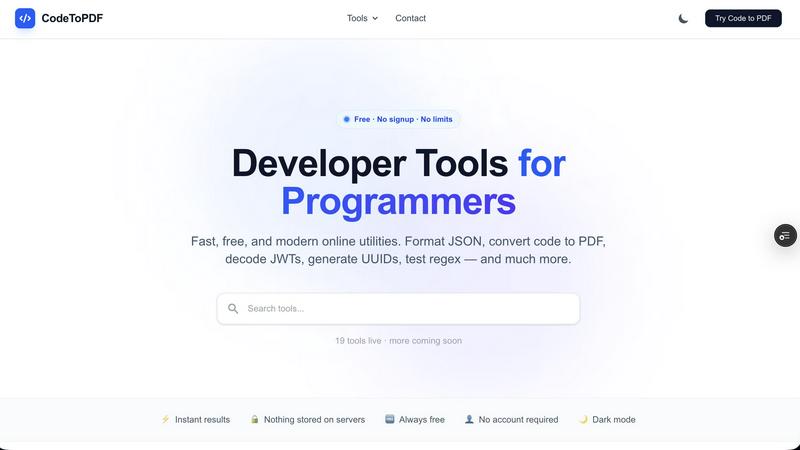
About CodeToPDF
CodeToPDF is a comprehensive suite of free, instant web utilities designed specifically for software engineers, data analysts, and technical professionals who need reliable, fast, and private online tools. Built out of the frustration of dealing with paywalled, ad-heavy, or overly complex online utilities, CodeToPDF offers a clean, distraction-free environment to get your daily technical tasks done quickly. The platform currently hosts 19 live tools with more coming soon, covering PDF generation, data formatting and validation, encoding and decoding, generators, and general utilities. At its core, CodeToPDF enables seamless conversion of raw code, HTML, and Markdown files into professionally formatted PDF documents with syntax highlighting and custom styling. Beyond PDF generation, it provides instant JSON and XML formatters and validators that pinpoint syntax errors down to the exact line and column, as well as encoders and decoders for Base64 strings, URL strings, and JWT tokens. The platform operates on a zero-friction philosophy: there are no sign-ups, no paywalls, and no usage limits. Tools react instantly as you type, eliminating the need for submit buttons. Crucially, CodeToPDF is privacy-first, with the vast majority of data processing happening entirely locally in your browser, meaning your sensitive code, data, and tokens never touch external servers. With dark mode support and a modern interface, CodeToPDF provides a professional-grade toolkit that is always free and always available.
Features of CodeToPDF
PDF Generation with Syntax Highlighting
CodeToPDF offers powerful PDF generation tools that convert raw source code, Markdown documents, and HTML with CSS into highly readable, professionally formatted PDF documents. The Code to PDF converter supports over 50 programming languages including JavaScript, Python, Java, Go, Rust, and many more, applying syntax highlighting with customizable themes. Users can drag and drop multiple files, choose a preferred color theme, and download instantly. The Markdown to PDF converter preserves headings, code blocks, tables, and lists, while the HTML to PDF converter supports flexbox, CSS tables, Google Fonts, and custom styles, ensuring pixel-accurate output. This makes the tool perfect for saving documentation, generating reports, printing code snippets for review, or creating invoices.
Instant Data Formatting and Validation
CodeToPDF provides eight dedicated formatters and validators that help developers clean, beautify, and debug structured data instantly. The JSON Formatter and Validator tools indent and validate JSON syntax, highlighting errors with exact line and column references for rapid debugging. The JSON Compare tool allows side-by-side comparison of two JSON objects, highlighting added, removed, and changed keys with full dot-notation paths. Additional formatters cover SQL (supporting MySQL, PostgreSQL, SQLite, T-SQL, and BigQuery), HTML, CSS, XML, and YAML (with conversion between YAML and JSON). Each tool provides clean, indented output instantly, helping developers quickly identify syntax errors and maintain readable code.
Secure Encoding and Decoding Tools
The platform includes three essential encoding and decoding utilities that operate entirely within the browser for maximum security. The Base64 Encode tool instantly converts any text or data to Base64 format, supporting both standard and URL-safe variants. The Base64 Decode tool reverses the process, handling both variants with built-in error detection. The JWT Decoder allows developers to inspect JSON Web Tokens by viewing the header, payload, expiry timestamp, and all claims. Critically, JWT decoding happens entirely client-side, so sensitive token data never leaves the user's browser or reaches any server. These tools are essential for debugging authentication flows, inspecting API payloads, and safely handling encoded data.
Developer Utilities and Generators
CodeToPDF rounds out its toolkit with five additional utilities that address common developer needs. The UUID Generator creates cryptographically secure v4 UUIDs, supporting bulk generation of up to 100 UUIDs at once with a single click. The QR Code Generator produces QR codes for any URL, text, or data, with download options in PNG or SVG format and customization of size, colors, and error correction levels. The Regex Tester allows developers to test and debug regular expressions with live match highlighting, capture group display, and real-time match counting. These tools are designed for speed and simplicity, running entirely in the browser with no server interaction, ensuring instant results and complete privacy.
Use Cases of CodeToPDF
Creating Professional Code Documentation
Software engineers can use the Code to PDF converter to transform source code files into beautifully formatted, syntax-highlighted PDFs for documentation, code reviews, or portfolio presentations. By dragging and dropping multiple files, selecting a theme, and downloading instantly, developers can generate clean, readable documentation that preserves code structure and coloring. This is particularly useful for sharing code snippets with non-technical stakeholders, creating handouts for workshops or training sessions, or compiling code samples for job applications. The ability to convert Markdown documents to PDF also allows for creating complete technical documentation with proper headings, code blocks, and tables.
Debugging API Responses and Data Payloads
Data analysts and backend developers frequently need to inspect and validate JSON or XML responses from APIs. CodeToPDF's JSON and XML formatters and validators make this process instantaneous. By pasting raw API responses into the formatter, users can instantly beautify the data, identify syntax errors with exact line and column references, and compare two different response versions side-by-side. This accelerates debugging of data payloads, helps identify malformed responses from third-party services, and ensures data integrity before processing. The SQL formatter also aids in debugging database queries by making complex SQL statements readable and properly indented.
Inspecting JWT Tokens for Authentication Debugging
Security-conscious developers and DevOps engineers frequently need to decode and inspect JWT tokens to verify authentication flows, check token expiry, and examine claims. CodeToPDF's JWT Decoder allows users to paste a token and instantly view its header, payload, and signature information. Since all processing happens locally in the browser, sensitive authentication tokens never leave the user's machine, addressing critical security concerns. This is invaluable when debugging OAuth implementations, verifying token structures from identity providers, or troubleshooting authorization issues in microservices architectures. The Base64 encoder and decoder further support related debugging tasks.
Generating Unique Identifiers and Testing Regular Expressions
Developers working on database schemas, distributed systems, or testing frameworks can use the UUID Generator to instantly create cryptographically secure v4 UUIDs in bulk. This eliminates the need for command-line tools or external libraries when generating test data or unique identifiers. Similarly, the Regex Tester provides a live environment for constructing and debugging regular expressions, with immediate visual feedback showing matched text and capture groups. This is essential for data validation tasks, log parsing, form input validation, and text processing workflows. Both tools operate instantly with no submit buttons, providing real-time results as users type.
Frequently Asked Questions
Is CodeToPDF really free with no limits?
Yes, CodeToPDF is completely free with no usage limits, no sign-ups, and no paywalls. All 19 tools are available to use immediately without creating an account or providing any personal information. There are no hidden charges, no premium tiers, and no restrictions on how many times you can use the tools. The platform is designed to be always accessible and always free for all technical professionals.
Does CodeToPDF store my data on its servers?
No, CodeToPDF is built with a privacy-first architecture. The vast majority of data processing happens entirely locally in your browser using client-side JavaScript. Your code, data, JSON payloads, JWT tokens, and any other information you input never leave your computer or touch CodeToPDF's servers. This means your sensitive data, proprietary code, and authentication tokens remain completely private and secure.
What programming languages does the Code to PDF converter support?
The Code to PDF converter supports over 50 programming languages, including major languages like JavaScript, Python, TypeScript, Go, Rust, Java, C++, C#, PHP, Ruby, Swift, Kotlin, and many more. The tool automatically detects the language based on the file extension or content and applies appropriate syntax highlighting. Users can also manually select a language theme for optimal formatting.
Do I need to click a submit button to use the tools?
No, CodeToPDF tools are designed for zero friction. They react instantly as you type, with no need to click a submit button or press enter. The formatters, validators, encoders, and generators all provide real-time output that updates automatically as you input or modify your data. This instant feedback loop makes debugging and formatting tasks significantly faster and more intuitive.
Similar to CodeToPDF

ButterShare is a browser-based peer-to-peer file transfer tool that lets you send large files and folders directly between devices without signup or c

A human-curated directory for builders. Skip bot-scraped spam and discover verified SaaS apps, practical AI tools, and custom n8n workflows.

A free launch checklist for SaaS, apps, AI tools and more. Every step says why it matters and when you can skip it.

From first scene to published 2D game, no code

Free online screen test — diagnose dead pixels, lines, color issues & flicker. No download.

The #1 Native Form Builder Plugin for Framer - No Code, No Embeds, No External Platforms.

Chat with random strangers online for free on ChatIt.me. Enjoy safe, anonymous, and instant 1-on-1 conversations with people worldwide

Create QR codes instantly for free — no signup, no watermark, no paywall.