
QuickTextTools
QuickTextTools provides over 76 free, browser-based utilities for writers and creators to instantly process and optimize text without any sign-up.
Visit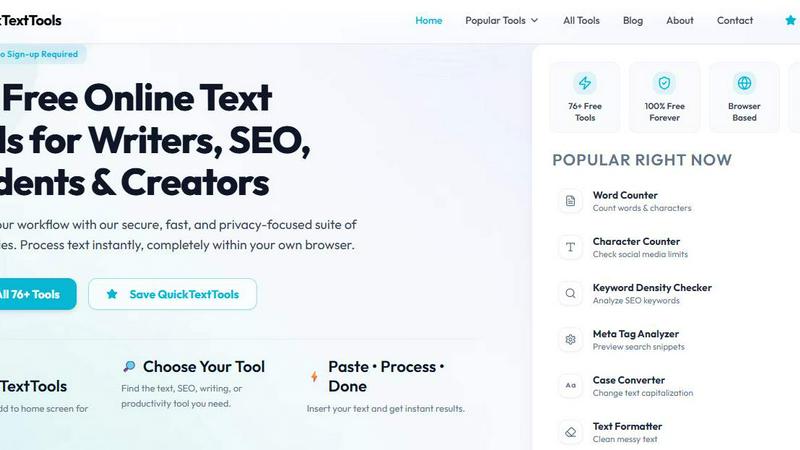
About QuickTextTools
QuickTextTools is a completely free, user-friendly online platform that provides over 76 browser-based utilities designed to significantly enhance productivity for writers, marketers, developers, students, SEO professionals, and content creators. This comprehensive toolkit offers a diverse range of tools, including text formatting utilities, SEO analysis tools, writing assistants, keyword management resources, and developer utilities, all aimed at simplifying daily workflows and saving valuable time. The platform is built around the core principles of speed, ease of use, and privacy, with all processing occurring directly within your own browser. This eliminates the need for complicated software setups, downloads, or account registrations, ensuring a secure and hassle-free experience. Whether you need to clean up a messy keyword list, analyze SEO meta tags for better search engine visibility, convert text case formatting, or improve your overall writing process, QuickTextTools delivers practical, instant solutions. The platform is organized into clear categories like Writing Tools, SEO Tools, Text Cleaning Tools, Developer Tools, and Productivity Tools, making it simple to find the exact utility you need. With no sign-up required and a commitment to remaining 100% free forever, QuickTextTools empowers users to work smarter and more efficiently, directly from their web browser.
Features of QuickTextTools
Comprehensive Text Processing and Analysis
QuickTextTools offers a robust suite of text analysis tools that go beyond basic counting. The Word Counter, Character Counter, and Sentence Counter provide precise metrics, while the Reading Time Calculator estimates both reading and speaking durations. This feature is essential for writers and content creators who need to adhere to strict length requirements for social media posts, articles, or scripts, ensuring content is perfectly tailored for its intended platform and audience.
SEO Optimization and Keyword Management
The platform includes powerful SEO utilities such as a Keyword Density Checker, Meta Tag Analyzer, and Meta Tag Generator. These tools allow users to analyze keyword frequency within their content, preview how their pages will appear in search engine results, and generate optimized meta tags. Additionally, the Keyword Builder helps in creating comprehensive keyword lists, making QuickTextTools an invaluable resource for improving organic search performance and content strategy.
Advanced Text Cleaning and Formatting
The Text Cleaning tools are designed to instantly fix messy text. Users can remove extra spaces, eliminate duplicate lines, strip out hidden HTML tags, and clean up special characters with a single click. The Case Converter allows for instant transformation of text to uppercase, lowercase, title case, or sentence case. This feature is particularly useful for cleaning data imported from spreadsheets, reformatting content for different platforms, or preparing clean text for further processing.
Developer and Productivity Utilities
For developers and power users, QuickTextTools includes a JSON Formatter, Base64 Encoder, URL Encoder, and QR Code Generator. These tools enable quick data formatting, encoding, and code generation directly in the browser. The Productivity section features a Pomodoro Timer, Countdown Timer, Text Sorter, and Random Word Generator, helping users manage their time, organize lists, and generate creative ideas without needing to switch between multiple applications.
Use Cases of QuickTextTools
Content Creation and Optimization for Writers
A freelance writer working on multiple client projects can use the Word Counter and Reading Time Calculator to ensure articles meet specific word counts and reading time goals. The Case Converter helps in quickly reformatting headlines, while the Text Cleaner removes unwanted formatting from copied text. The Keyword Density Checker ensures that SEO keywords are used appropriately without overstuffing, helping the writer produce content that is both engaging for readers and optimized for search engines.
SEO Auditing and Website Optimization
An SEO specialist auditing a client's website can utilize the Meta Tag Analyzer to preview how pages appear in search results and identify missing or poorly written meta descriptions. The Keyword Density Checker helps analyze competitor content, while the Meta Tag Generator creates optimized tags for new pages. The Text Compare Tool can be used to compare original and updated content versions, ensuring all changes are correctly implemented and improving the site's overall search engine ranking potential.
Data Cleaning and Preparation for Students
A student conducting research and gathering information from various online sources often ends up with messy, inconsistent text. Using the Text Cleaner, Remove Extra Spaces, and Duplicate Line Remover tools, they can quickly sanitize their data. The Case Converter standardizes formatting for citations, and the Word Counter helps track progress on essays or reports. This streamlines the research process, allowing the student to focus on analysis and writing rather than manual data cleaning.
Developer Workflow and Password Management
A developer working on a web application can use the URL Encoder to prepare query strings, the Base64 Encoder for data transmission, and the JSON Formatter to debug API responses. The QR Code Generator can create codes for quick mobile testing or sharing links. Additionally, the Random Password Generator creates strong, secure passwords for testing environments or personal accounts, all without leaving the browser or requiring any software installation.
Frequently Asked Questions
Is QuickTextTools really free, and do I need to create an account?
Yes, QuickTextTools is 100% free to use, and there is absolutely no sign-up or account registration required. You can access all 76+ tools immediately upon visiting the website. The platform is committed to remaining free forever, with no hidden charges or premium tiers that lock away features.
How does QuickTextTools ensure my data privacy and security?
QuickTextTools operates entirely within your own web browser. All text processing, analysis, and formatting are performed locally on your device. No data is ever uploaded to any external server or stored on the platform. This means your sensitive content, including SEO research, drafts, or personal information, remains completely private and secure at all times.
Do I need to download any software or install anything to use the tools?
No, you do not need to download or install any software. QuickTextTools is a web-based platform that works directly in your browser. Simply visit the website, choose a tool, paste or type your text, and get instant results. This makes it accessible from any device with an internet connection, including computers, tablets, and smartphones.
What types of tools are available on QuickTextTools?
The platform offers over 76 tools organized into clear categories. These include Writing Tools (Word Counter, Character Counter, Reading Time Calculator), SEO Tools (Keyword Density Checker, Meta Tag Analyzer, Meta Tag Generator), Text Cleaning Tools (Text Cleaner, Duplicate Line Remover, Remove Extra Spaces), Developer Tools (JSON Formatter, Base64 Encoder, QR Code Generator), and Productivity Tools (Pomodoro Timer, Text Sorter, Random Word Generator). New tools are added regularly.
Can I use QuickTextTools on my mobile phone or tablet?
Yes, QuickTextTools is designed to be fully responsive and works seamlessly on all devices, including mobile phones, tablets, and desktop computers. You can bookmark the site or add it to your home screen for instant access, making it a convenient companion for on-the-go tasks like checking social media post lengths or analyzing SEO snippets.
Explore more in this category:
Similar to QuickTextTools

Apps and files on an infinite canvas where people and AI agents work together.

ROIpad turns positioning into a data-driven science. Track competitor moves and live market signals to find exact high-converting messaging gaps.

All-in-one POS, inventory, accounting and HR software for Bangladeshi SMEs — real-time sales, stock and finance in one place.

AI meeting notes, transcripts, summaries and action items on iPhone, iPad and Android.

ButterShare is a browser-based peer-to-peer file transfer tool that lets you send large files and folders directly between devices without signup or c

Free light screen tool online. Turn any display into a flashlight, ambient light, or solid-color screen. No download or sign-up.

AI Email Filter sorts incoming mail into folders using plain-language prompts you write. Works with any IMAP mailbox; bring your own LLM if you want.

LeadsReddit helps founders, marketers, and sales teams find people on Reddit who are actively looking for what they sell. Instead of scrolling through