
QUVIAI
QUVIAI uses AI to generate photorealistic renders, videos, 3D scenes, and music from simple text or image inputs.
Visit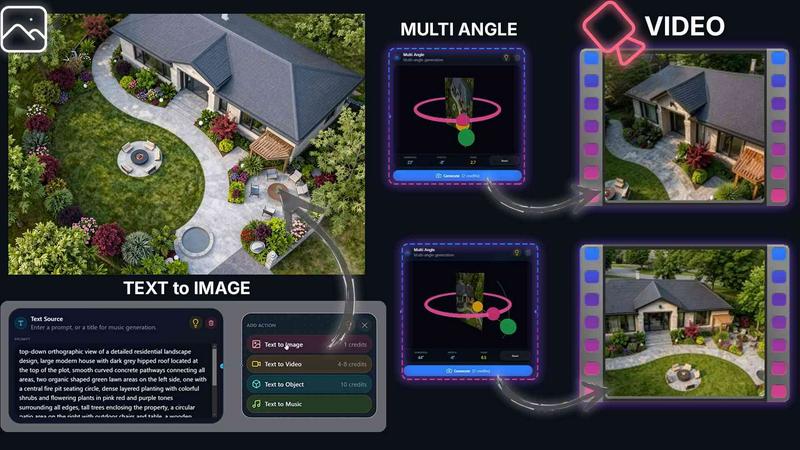
About QUVIAI
QUVIAI is a comprehensive, all-in-one AI-powered creative platform specifically engineered for architects, designers, and creators who need to rapidly transform conceptual ideas into production-ready visual assets. The platform eliminates the traditional workflow fragmentation by integrating image generation, video creation, 3D modeling, rendering, and even music composition into a single, unified workspace. Users can upload a simple sketch, a reference image, or a 3D model and convert it into photorealistic renders, cinematic video walkthroughs, multi-angle perspective sets, detailed floor plan renders, and original music tracks without switching between multiple software applications. At its core, QUVIAI features a built-in 3D workspace that allows users to model, render, and iterate seamlessly. Scenes can be edited using intuitive text prompts, and users can generate custom furniture and decorative objects, stage them precisely within a scene, and produce cinematic walkthroughs defined by start and end frames. The platform is designed to accelerate the architectural design pipeline, from early concept exploration and client presentations to final marketing materials. QUVIAI is accessible across web browsers, iOS, and Android devices, ensuring that creative workflows can continue anywhere. With a focus on blending cutting-edge artificial intelligence with practical usability, QUVIAI empowers professionals to achieve high-quality results in a fraction of the time traditionally required, making it an indispensable tool for modern architectural visualization and creative production.
Features of QUVIAI
AI Image Generation
This feature allows users to turn any text prompt or reference image into stunning, photorealistic architectural renders in a matter of seconds. The AI understands complex architectural styles, materials, and lighting conditions, enabling users to quickly visualize concepts, iterate on design alternatives, and produce presentation-ready visuals without manual rendering expertise. It is the core tool for rapid visual exploration.
AI Video Creation
QUVIAI enables users to animate static images, generate immersive walkthroughs, or create cinematic sequences from a single text or image prompt. This feature bridges the gap between still renders and dynamic presentations, allowing architects and designers to produce compelling video content that communicates spatial flow, lighting transitions, and the overall experience of a design in a highly engaging format.
Multi Angle Camera Suite
With this tool, users can generate multiple architectural viewpoints from a single source image. This capability is invaluable for creating richer, more comprehensive presentation-ready perspective sets. Instead of manually setting up multiple camera angles, the AI automatically produces a variety of consistent views, saving significant time while ensuring a cohesive visual narrative across all angles.
Object Staging
This feature allows users to generate 3D objects, such as furniture and decorative items, and then stage them directly into existing scene backgrounds. The AI ensures that the staged objects integrate seamlessly with the scene's lighting and perspective, producing polished compositions. This streamlines the process of populating interiors and exteriors with realistic content, enhancing the overall quality and believability of the render.
Use Cases of QUVIAI
Architectural Concept Visualization
Architects can rapidly transform initial hand-drawn sketches or simple 3D massing models into photorealistic renders using the AI Image Generation feature. This allows for quick iteration on design concepts, material selections, and lighting schemes during early design phases, facilitating faster client feedback and decision-making without the need for extensive manual rendering.
Cinematic Client Presentations
Designers can use the AI Video Creation and Multi Angle Camera tools to produce professional, cinematic walkthroughs and comprehensive view sets for client presentations. Instead of showing static images, professionals can offer an immersive experience that showcases the flow and feel of a space, dramatically improving the persuasive power of their proposals and winning more projects.
Interior Design and Furniture Layout
Interior designers can leverage the Object Staging feature to generate and place custom furniture and decorative objects into a room scene. By using text prompts to define the style and material of the objects, designers can quickly test different layouts and aesthetic combinations, ensuring the final design is both functional and visually cohesive before any physical work begins.
Real Estate Marketing
Real estate professionals can use QUVIAI to create high-quality marketing materials, including photorealistic renders of unbuilt properties and cinematic video tours. The ability to generate multiple angles and staged scenes from a single model allows for the rapid production of compelling listings that attract potential buyers and investors, significantly reducing the time and cost of traditional marketing content creation.
Frequently Asked Questions
What types of input files does QUVIAI support for creating renders and videos?
QUVIAI is designed for flexibility and supports a variety of input types. Users can upload a simple hand-drawn sketch, a reference image (such as a photograph or a digital concept), or a 3D model file. The platform's AI then processes these inputs to generate photorealistic renders, cinematic videos, and multi-angle views, making it adaptable to different stages of the creative workflow.
Can I edit and refine my creations after they are generated within QUVIAI?
Yes, QUVIAI includes a dedicated Edit suite that allows for detailed refinement of generated visuals. Users can utilize tools for masking, inpainting, cleanup, and detail adjustments. Additionally, scenes created within the 3D workspace can be edited using text prompts, enabling iterative changes to materials, lighting, and object placement without needing to start from scratch.
Is QUVIAI available on mobile devices, or is it only a web application?
QUVIAI is designed for accessibility across multiple platforms. It is available as a web application that can be accessed from any modern browser, and it also offers dedicated native applications for both iOS and Android devices. This cross-platform availability ensures that users can start or continue their creative projects whether they are at their desk or on the go.
Is there a free trial available to test the platform before committing to a paid plan?
Yes, QUVIAI offers a free trial for new users. By signing up on the platform's website or app, users receive free credits that can be used to generate their first renders, videos, and other creative outputs. This allows potential customers to explore the platform's features, evaluate its performance, and determine if it meets their professional needs before deciding on a paid subscription.
Similar to QUVIAI

Create AI videos, images, avatars, and audio in one creative workspace.

Create polished AI images and videos from prompts or references for social posts, ads, flyers, album covers, and campaigns.

PerchanceAI is a free AI video generator and a free AI image generator with no sign-up required.

AI YouTube thumbnail maker that helps creators generate high-click thumbnails faster.

Create AI video, image, and music assets in one model-aware workspace.

HubVanta AI helps creators generate images and videos with advanced AI tools for visual content workflows.

One-click UGC videos, product photo sets, and reusable AI workflows

Morse Code Translator lets you encode text, decode Morse from audio or images, and play clean telegraph sounds in one focused workspace.