
Remove Handwriting
Effortlessly erase handwritten text from images and PDFs while preserving original content with our AI-powered removal tool.
Visit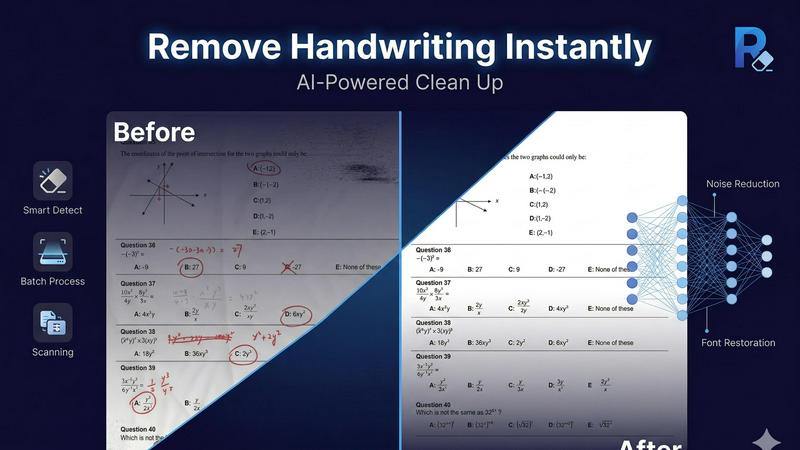
About Remove Handwriting
Remove Handwriting is an innovative AI-powered tool designed to efficiently erase handwritten text, notes, and annotations from images, PDFs, and scanned documents in mere seconds. This software is particularly beneficial for educators, students, researchers, and professionals who frequently work with documents that contain both printed and handwritten content. The main value proposition of Remove Handwriting lies in its ability to preserve the integrity of printed text, tables, and diagrams while meticulously eliminating unwanted handwritten marks. Whether you are looking to clean up exam papers, contracts, or archived materials, this tool streamlines the document cleanup process. Compatible with various file formats including JPG, PNG, JPEG, and PDF, it offers both a web-based interface and mobile applications for iOS and Android, making it accessible and user-friendly for diverse workflows. Plus, you can try it for free without needing a credit card, allowing users to experience its capabilities firsthand.
Features of Remove Handwriting
AI-Powered Handwriting Removal
This feature utilizes advanced artificial intelligence algorithms to detect and erase handwritten annotations while keeping printed content intact. It ensures that users receive a clear and professional-looking document without the clutter of handwritten notes.
Multi-Format Support
Remove Handwriting supports various file formats including JPG, PNG, JPEG, and PDF, allowing users to process images and documents with ease. This multi-format capability makes it versatile for different types of documents, enhancing its usability across various scenarios.
Batch Processing
For users needing to process multiple documents simultaneously, the batch processing feature allows for efficient handling of large workloads. This is ideal for institutions or businesses that regularly manage numerous documents, saving time and increasing productivity.
Mobile Accessibility
Available on both iOS and Android platforms, Remove Handwriting allows users to perform handwriting removal on-the-go. This feature is particularly useful for students and professionals who need to clean up documents right from their smartphones or tablets.
Use Cases of Remove Handwriting
Academic Document Cleanup
Students and educators can use Remove Handwriting to clean up exam papers and worksheets by erasing handwritten notes and grades, resulting in a polished version that can be shared or printed.
Contract Management
Businesses can benefit from this tool by removing handwritten annotations from contracts, ensuring that only the official printed text is visible, which is crucial for legal clarity and professionalism.
Archiving Historical Documents
Archivists and historians can restore old documents by removing unwanted handwriting and marks, preserving the original printed content for future reference and study.
Enhanced Presentation Materials
Professionals preparing presentations can utilize Remove Handwriting to clean up scanned documents and images, ensuring that only the necessary content is visible, thus enhancing the overall clarity and effectiveness of their presentations.
Frequently Asked Questions
How does Remove Handwriting work?
Remove Handwriting employs AI algorithms to analyze images and documents, detecting handwritten text and intelligently removing it while preserving the original printed content.
Is there a limit to the number of documents I can process?
While the free version allows for individual document processing, the batch processing feature is available for larger workflows, accommodating multiple documents at once.
Can I use Remove Handwriting on mobile devices?
Yes, Remove Handwriting is available as an app for both iOS and Android devices, allowing you to remove handwriting from documents conveniently on-the-go.
Do I need a credit card to try Remove Handwriting?
No, you can try Remove Handwriting for free without the need for a credit card, enabling you to explore its features and capabilities risk-free.
Explore more in this category:
Similar to Remove Handwriting

Create AI videos, images, avatars, and audio in one creative workspace.

Create polished AI images and videos from prompts or references for social posts, ads, flyers, album covers, and campaigns.

PerchanceAI is a free AI video generator and a free AI image generator with no sign-up required.

AI YouTube thumbnail maker that helps creators generate high-click thumbnails faster.

Create AI video, image, and music assets in one model-aware workspace.

HubVanta AI helps creators generate images and videos with advanced AI tools for visual content workflows.

One-click UGC videos, product photo sets, and reusable AI workflows

Morse Code Translator lets you encode text, decode Morse from audio or images, and play clean telegraph sounds in one focused workspace.