
LoadTester
LoadTester is a modern HTTP and API load testing tool that runs distributed performance checks from your browser or CI/CD pipeline without managing.
Visit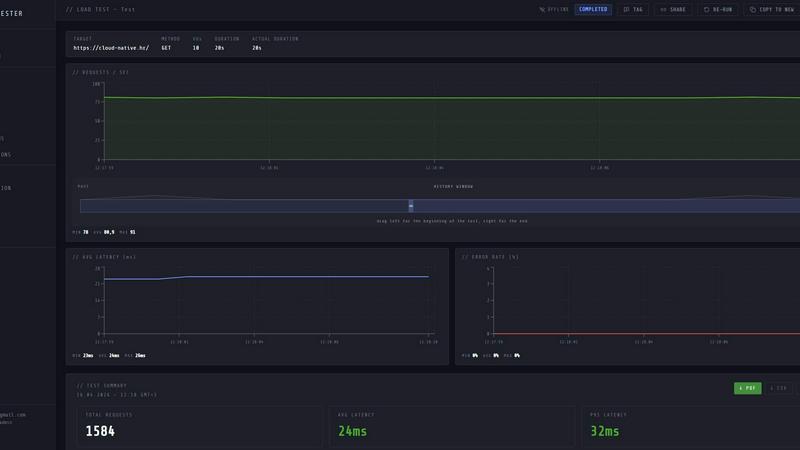
About LoadTester
LoadTester is a modern HTTP and API load testing tool designed by Cloud Native d.o.o. for engineering teams that need repeatable performance checks without the overhead of managing infrastructure. It enables developers to run distributed load tests directly from their browser or integrate them into CI/CD pipelines, providing live analytics, p95/error-rate thresholds, scheduled baselines, and run-to-run comparisons. The core value proposition is simplicity: teams can create a test, choose virtual users or requests per second, monitor live latency and error rates, review completed results, compare runs, and catch performance regressions before users notice. LoadTester eliminates the need for setting up and maintaining load testing infrastructure, worker orchestration, or scheduling tools. It includes exports in PDF, CSV, and JSON formats, scheduled tests, API access, and workflow integrations for teams that want simple, repeatable performance checks. The platform supports up to 10,000 virtual users (VUs) and 10,000 requests per second (RPS) per test, with a cold start time of less than three seconds from test launch to first request. It is built for scale, performance, and reliability, with auto-scaling workers and zero infrastructure to provision. LoadTester is ideal for development teams, QA engineers, site reliability engineers (SREs), and platform teams who need to validate application performance under load, catch regressions early, and ship with confidence. A free plan is available, making it accessible for small teams and individual developers to start performance testing immediately.
Features of LoadTester
Instant Execution and Distributed Workers
LoadTester starts distributed load tests in seconds, with no infrastructure setup required. The platform bootstraps workers in under three seconds, auto-scales them based on test requirements, and eliminates queue times. Teams can focus on writing tests and analyzing results while LoadTester handles worker scaling, infrastructure coordination, and execution flow. This feature removes the painful overhead of orchestrating load testing environments, making performance testing as simple as hitting a button or triggering a CI job.
Live Analytics and Real-Time Telemetry
During a test run, LoadTester provides live streaming analytics that include throughput (RPS), latency percentiles (p50, p95, p99), active virtual users, and error counts. These metrics update in real time, allowing teams to observe behavior changes and bottlenecks as they happen. The live dashboard replaces the traditional approach of waiting for test completion to analyze logs, enabling immediate insights and faster debugging of performance issues.
Smart Auto-Stop with Thresholds
LoadTester allows teams to set failure and latency thresholds that automatically stop tests when conditions are breached. For example, users can configure auto-stop if p95 latency exceeds 400 milliseconds or if the error rate surpasses two percent. This feature prevents wasted compute time and resource consumption during runaway tests, and it protects production-like environments from prolonged overload. Thresholds can also trigger notifications via Slack, email, or webhooks.
CI/CD Integration and Automation
LoadTester is built for continuous integration and deployment workflows. It provides API access, webhook triggers, and Slack/email alerts that integrate seamlessly with release pipelines. Teams can schedule nightly baseline tests, run performance gates on every deploy, and compare results across builds. The platform supports exporting results in PDF, CSV, or JSON formats, making it easy to share performance data with stakeholders or attach to release notes.
Use Cases of LoadTester
Pre-Release Performance Validation
Before launching a new feature or service update, engineering teams can run load tests to validate that the application meets latency and throughput SLOs. LoadTester enables teams to define thresholds for p95 latency and error rates, run tests from CI/CD, and automatically fail the pipeline if performance degrades. This catch regressions before they reach users and ensures that every release ships with confidence.
Capacity Planning and Scaling Analysis
Platform and infrastructure teams can use LoadTester to simulate traffic spikes and determine the maximum capacity of their services. By running tests with increasing virtual users or request rates, teams can identify bottlenecks, understand how the system scales under load, and make informed decisions about resource allocation. The live analytics and run-to-run comparisons help track performance trends over time.
API Endpoint Benchmarking
Developers building RESTful APIs or microservices need to understand the baseline performance of each endpoint. LoadTester allows them to create specific tests for individual endpoints, run them on a schedule, and compare results across versions. The clear summary of total requests, average latency, p95, data sent, and data received provides actionable data for optimizing API response times and resource usage.
Continuous Regression Detection
Teams that deploy frequently can use LoadTester to run automated performance tests as part of their nightly build or after every merge. By comparing current run results against a stored baseline, LoadTester can detect regressions in latency, error rates, or throughput. Notifications are sent automatically to Slack or email, allowing developers to address performance degradations before they impact end users.
Frequently Asked Questions
How does LoadTester handle infrastructure for distributed load tests?
LoadTester manages all infrastructure automatically. When a test is launched, the platform boots and scales workers in under three seconds, with no manual setup required. Users do not need to provision servers, configure networking, or manage worker pools. The system handles worker coordination, scheduling, and teardown, allowing teams to focus entirely on test creation and result analysis.
What types of tests can I create with LoadTester?
LoadTester supports HTTP and API load tests using GET, POST, PUT, and DELETE methods. Users can configure tests in either Virtual Users (VUs) mode or Requests Per Second (RPS) mode. You can set target URLs, define rate and duration parameters, and optionally configure thresholds for auto-stop. The platform is designed for both simple endpoint benchmarks and complex multi-step scenarios.
Can I integrate LoadTester into my CI/CD pipeline?
Yes, LoadTester is built for CI/CD integration. It provides API access for programmatic test execution, webhook triggers for post-completion actions, and Slack/email alerts for threshold breaches. You can schedule tests to run automatically on a daily or event-driven basis, and export results in PDF, CSV, or JSON formats for inclusion in build reports or release notes.
Is there a free plan available, and what are its limitations?
Yes, LoadTester offers a free plan that allows teams to start performance testing immediately without any upfront cost. The free plan includes access to core features such as instant execution, live analytics, and basic thresholds. For higher limits on virtual users, requests per second, scheduled tests, and advanced integrations, users can upgrade to a paid tier. Specific pricing details are available on the LoadTester website.
Pricing of LoadTester
LoadTester offers a free plan for individual developers and small teams to get started with basic load testing. For teams that need higher throughput, more virtual users, scheduled tests, and advanced integrations such as API access and webhooks, paid tiers are available. Specific pricing plans and tier details can be found on the LoadTester website under the pricing section. The free plan is a great way to evaluate the platform before committing to a paid subscription.
Similar to LoadTester


Vidhyagen is an all-in-one platform for fast image conversion, background removal, and smart image processing tools.

A 100% human-curated directory to discover the absolute best AI, automation, and SaaS tools without the SEO spam.

Create product videos manually or let your AI agent control Screen Beaver through MCP—no mouse or keyboard needed.


Private developer utilities: 1000+ tools for coding, encryption, and analysis. No server uploads.

Async AI video workflow API for music videos, ecommerce ads, editable storyboards, webhooks, and hosted outputs.
